
You Never Know How You're Going to Inspire Others
"Your ordinary acts of love and hope point to the extraordinary promise that every human life is of inestimable value." — Desmond Tutu
Something incredibly special happens, often unnoticed, everyday - the unseen ways we impact our students' lives, effectively changing their trajectories without even being aware of it.
Do you recall those moments that felt like turning points in your life? For me, it was a throw away line from Star Trek IV: The Voyage Home. In the movie, Captain James T. Kirk has a memorable exchange when it is guessed that he is from outer space. His reply? "I'm from Iowa; I only work in space." This was a revelatory moment for a younger me who grew up in rural Ohio. It dawned on me that my geographic roots had no bearing on the height of the skies I could reach.
Now, think about your classroom. You might see it as merely a place where you come to teach facts and concepts. But for your students, it's much more. Every explanation, every demonstration, and even every joke you crack can spark something inside them. That lesson on the Pythagorean theorem? It could be setting a young mathematician on the path to groundbreaking research. Your encouragement to "always question the obvious"? You might be nurturing a future investigative journalist.
Don't underestimate the minor victories, such as praising a student for their improvement. Explaining a difficult concept after class could be the tipping point for a student who was on the verge of giving up. These may seem like trivial acts, but they can be immense and long-lasting.
Encouraging questions in class serves a dual purpose. You're not just fostering academic growth, you're also promoting curiosity and a thirst for knowledge. You're giving them tools to engage with the world meaningfully and critically.
When you step into your classroom next, keep this in mind: You're not just a teacher; you're a GPS guiding ships through uncharted waters. Whether it's delivering a lesson plan you've used a hundred times or a new experiment you're just dying to try out, remember that for someone in that room, this could be something they’ll always remember.

Tips & Tricks
Is the Chromebook infected with a virus? Not likely. But, you may see this on your students' Chromebooks. What has happened is that the student was on a sketchy site and clicked Allow when asked if the site could send notifications. To fix the issue, start with going to Settings and clicking on Privacy and security and then Site settings:
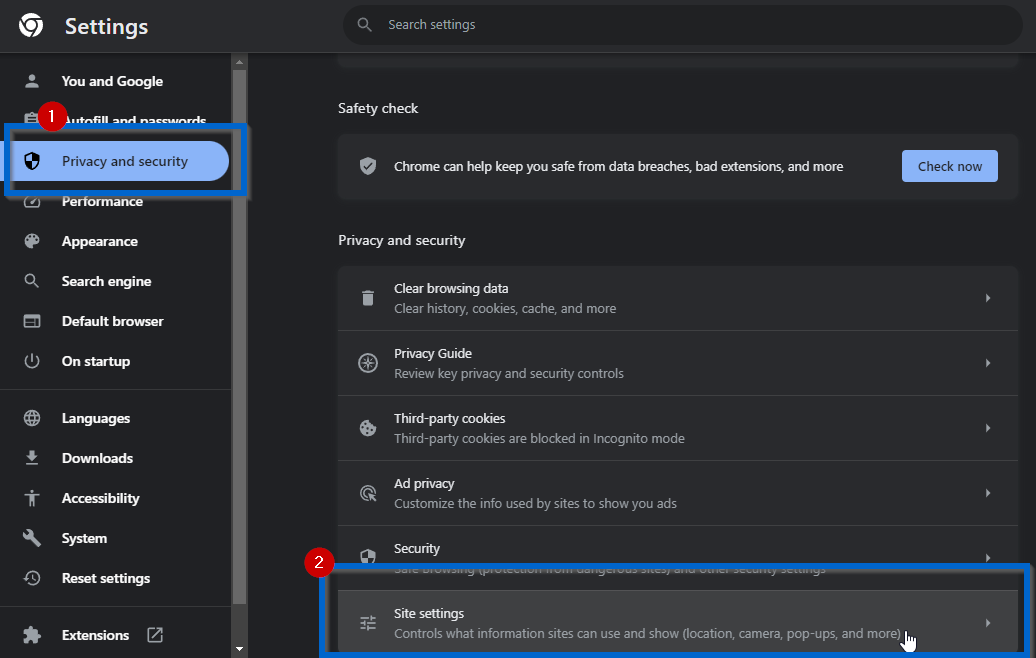
Scroll down and click on Notifications. At the bottom of this page will be a listing of sites that have been approved to send notifications:
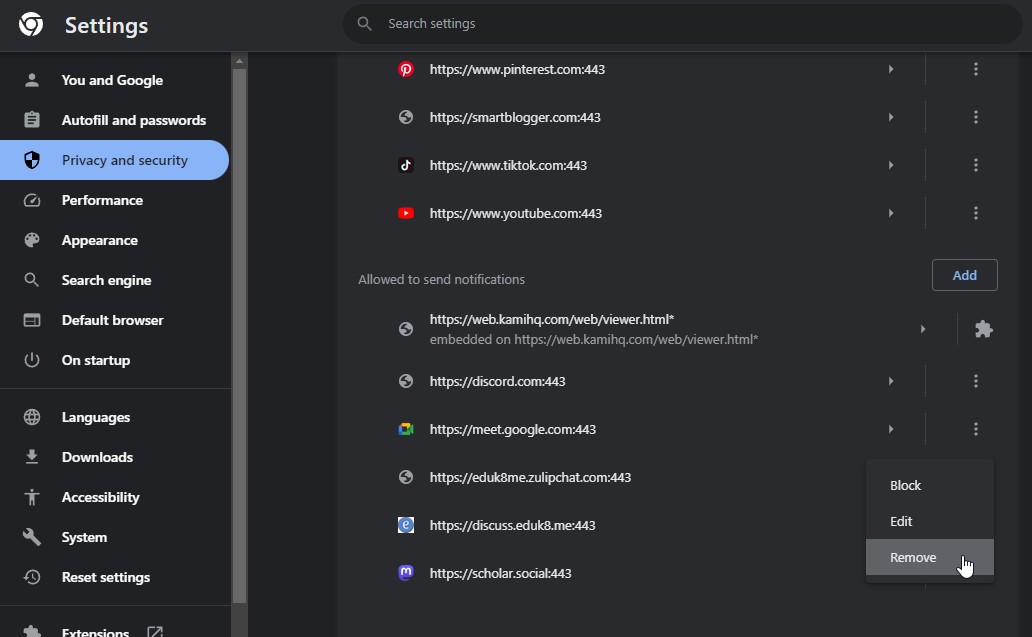
Click the three-dot menu beside any site you don't recognize or looks sketchy and select Remove. No more virus warnings! Follow these steps if you’ve accidentally enabled notifications on your desktop or laptop too.
Capture notes quickly with Gmail and a filter.
I'm very mobile which leads me to different ways to record information for later. One of those is a way to capture notes on the fly. These notes may be summarizing a conversation I had with a staff member, or some information that I don't want to forget. What I do is send it to my Gmail account and have a filter that skips the inbox and filters the email to my Notes folder. To get started, we need a way to recognize a new email as a note. In Gmail we can do this with +aliases. How it works is, if my address is ryan.collins@schoolwidedomain.com, I can add a plus and any words to the left of the @ and the email will still get to me. Our email address would look like ryan.collins+notes@schoolwidedomain.com.
Now that we have an email address, lets create a filter. In Gmail, click in the search bar and type to:ryan.collins+notes@schoolwidedomain.com (replacing that email address with one that works for you). Don't hit return, but hit the sliders icon to the right of the X:
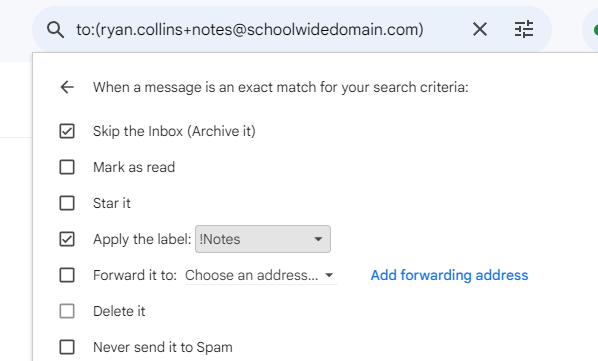
Then click Create filter. Here's where we set up the filter:
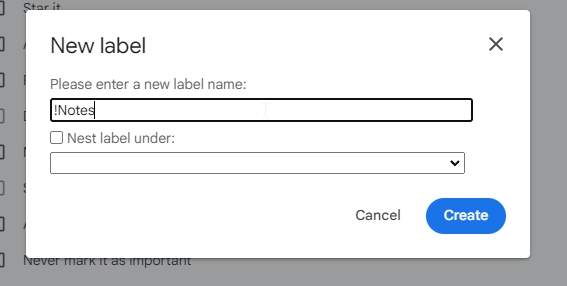
Enter a name like !Notes for the name. I use an exclamation point so the label will show up at the top of the list. Click Create to create your label.
Finish by clicking Create filter and you're done. Now you can remember everything with a quick email to your notes email address.
Learn21 Update
What's New with TDT - Asset and Reporting Webinar Review
This webinar provided an overview of new reporting features in the Tech Director Toolbox (TDT) Asset Manager software. TDT Asset Manager was previously called One2One Manager.
The updated homepage now includes helpful visualizations including an awesome heatmap of incidents by building. Users can also set building preferences to filter views and searches, providing quick metrics to assess incident counts over time.
The new device management insights provide at-a-glance overviews of device statuses without running reports. The owner management insights were also highlighted, providing users with the ability to see student, staff, and group counts quickly and easily.
In reporting, the new Activity Log Report allows tracking events and changes within the system. Caution is advised when running this report without filters, as it may slow the system down. Other updates aim to improve performance for exports. Filters have also been expanded, including new options for device labels.
In summary, this release focuses on enhancing reporting workflows and increasing visibility into assets. Users are encouraged to explore the new features and provide feedback to support@learn21.org.
Extra Credit
When the principal told the band students that their high school couldn't find a band teacher, 10 brave students said, "Hold my sheet music!" (Archive Link) Instead of folding, they cranked the amp up to 11 and formed a student-led band. Hailey, the junior drum queen, took the helm as their self-nominated director. Two math teachers said, "Calculus can wait," and volunteered as advisors. The students juggled instruments, literally and metaphorically, even getting over the awkwardness of being directed by a peer.
George Couros' latest post is about best practices. Not that best practices are something unknown, but that best practices usually start out as innovations.
Scott McLeod proposed the idea of a Social Impact elective and has followed up that article with examples of schools that already have one.
Know a great blogger? You can add them to your RSS reader so you don't miss a beat. Don't have an RSS reader? I can help you get started.
Bytes and Insights is written by Eduk8me’s Ryan Collins who writes about education and educational technology. He’s also the Director of Technology for Kenton City Schools in Ohio. Sign up for his Of Bits and Bytes newsletter at https://eduk8.me.