
Quickly access your favorite folders on macOS and Windows
Do you stick all of your documents on your desktop so you can get to them easier? Do you call your desktop icon arrangement a "well-designed piece of art" but deep down know that there is a better way to access your files and folders? Read on and see how to favorite or pin the folders you use the most. This practice will allow you to stay organized while accessing folders faster than leaving them on your desktop.
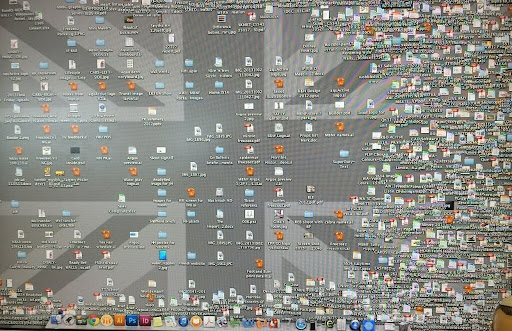
Busy desktop - Water Cooler - Forget the Queen, God save us all!
Both macOS and Windows give users places where they can bookmark or save most used folders. Once these favorites are set up you can access any folder, especially folders in your cloud drives, quick and easy.
Windows
In Windows, the process of marking folders as favorites is called "pinning." You can pin your favorite folders to Quick Access and the Start Menu.
Quick access is located in File Explorer on the left:
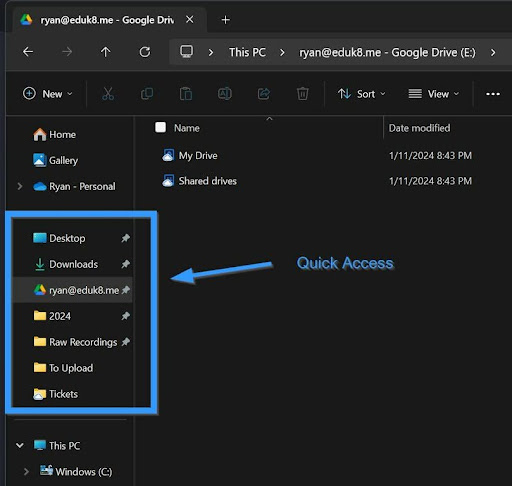
There are several folders pinned already as indicated by the pin on the right side of the folder. To pin a folder, right click on the folder and select Pin to Quick access:
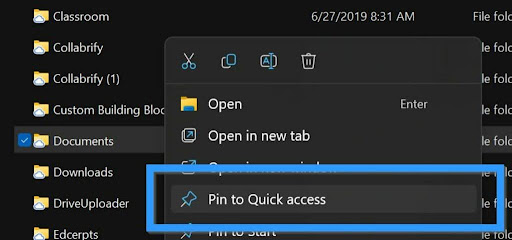
Now when you use File ➡ Open or File ➡ Save, you can select the folder directly on the left. This is an amazing time saver, especially if you like to organize your files several levels deep.
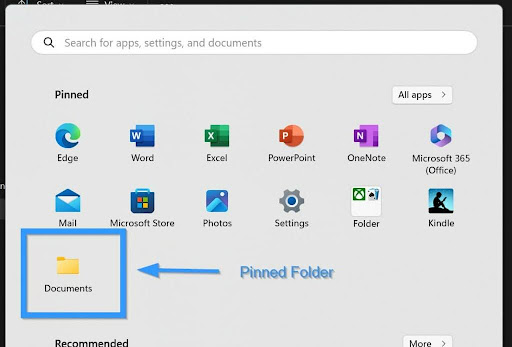
You can also pin folders to your Start Menu following the same process except for selecting Pin to Start instead of Pin to Quick access:
Adding to favorites on the Mac
The process is a little different on the Mac. There you will add the folders to Favorites and to their dock.
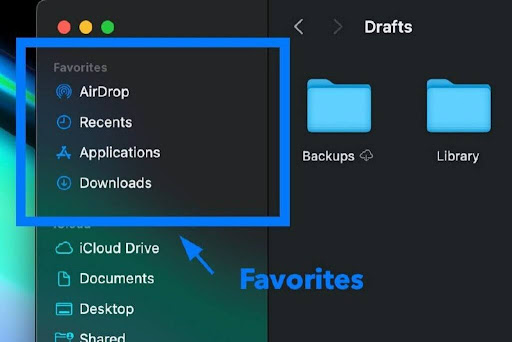

To add a folder to favorites, open a new Finder window and navigate to the folder you want to favorite. Once you have the folder on screen, drag it to the left under Favorites and drop it when a line is showing:
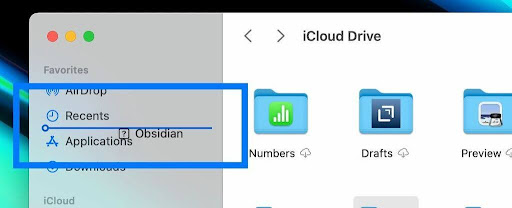
Do not drop the folder on to another folder, unless you want to copy everything to that other folder.
You can also drag the folder to your dock. There are three areas to the dock, segmented by two vertical lines. Everything to the left of the first vertical line is an app. Between the vertical lines are your recently used apps. You can place files and folders between the rightmost vertical line and the trash can.
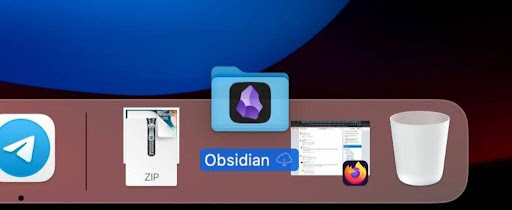
Drag the folder down to the dock, and as you move it to the left of the trash can, the dock will move the icons to make space for the folder.
Much like when dragging the folder to favorites, don't drag the folder on top of another folder or the trash!
Quickly access your most used folders
Now you can quickly jump to your most used folders and access these favorites from the Open/Save boxes in the apps or from the Finder/File Explorer. I can't follow Marie Kondo's techniques because too many things bring me joy. Being able to highlight my favorite folders brings order to my chaos.
Tips and Tricks
Users of Keynote for the Mac are going to scoff since they've had this ability for ten years. Now Google Slides can remove the background of an image. Eric Curts demonstrates this capability in Google Slides and Google Drawings. Now if only Google would add the morph transition.
Not since the addition of the typewriter transition has a capability been released with this much power to annoy. Google has updated Google Slides to make it easier to add animated gifs & stickers. This will make it a lot easier to spiff up your presentation without having to constantly switch tabs and copy/paste graphics.
In a Google Doc, you can create a link directly to specific places in a document. This makes it easy to share a large document with students and have them go directly to a specific place in the document. You can do this through using headings or creating a bookmark. If you add text with one of the headings, the bookmark is already created. Click anywhere in the line and copy the address.
The other way is to use the Insert menu and select Bookmark. A little bookmark will appear in your document, and you can copy the link directly from there.
Learn21 Update

Digital Learning Day - Innovator in Learning Award
In the ever-evolving landscape of education, digital learning has become an integral part of our classrooms, reshaping the way teachers educate and students learn. At Learn21, we recognize the pivotal role of educators who skillfully integrate technology into their teaching to enrich the learning experience. The Innovator in Instruction Award, awarded on Digital Learning Day, is our way of honoring these exceptional teachers who not only embrace digital learning but also elevate it to new heights.
This award celebrates educators who demonstrate outstanding innovation, effectiveness, and creativity in using digital tools and strategies to enhance student learning. It is a testament to their dedication to impart knowledge and inspire a lifelong love for learning in their students. These educators are the trailblazers who set benchmarks in digital education and pave the way for others to follow.
Through the Innovator in Instruction Award, Learn21 reaffirms its commitment to the K-12 education sector, acknowledging the vital role teachers play in shaping the minds of the future. Our goal is to support and empower educators, providing them with the tools and resources they need to succeed in this digital age. This award is more than just a recognition; it's a celebration of the passion, innovation, and dedication that these educators bring to their classrooms every day.
In honoring these exceptional individuals, we also reinforce our dedication to fostering new learning models, enhancing student outcomes, and improving teacher satisfaction. The Innovator in Instruction Award is not just an award; it's a symbol of our ongoing commitment to supporting educators and students in achieving their fullest potential.
You are welcome to nominate yourself or a colleague. The deadline for submissions is February 2, 2024. You can submit your nomination here. Awards will be announced on Digital Learning Day 2024, February 15. Please email training@learn21.org with questions.
Extra Credit
Seth Godin's post is mostly about selling some online courses but his opening paragraph is a banger: "In an economy built on skill, knowledge, and attitude, the single most powerful way to improve your productivity is to learn something."
Here's an interesting research into how different the number five is to the number four https://archive.is/MEBNY. The research paper looks into how we handle numbers, and the different areas of the brain that deal with quantities of 4 or less vs 5 or more. It's fascinating that there is such a difference in processing these quantities, and even more so, that an economist and philosopher discovered it over 150 years ago.
I'm lucky to be in a role where I don't have to plan or attend a lot of meetings. However, some people I know mention they feel like they attend too many meetings, sometimes coined as a culture of over-meetings. Sure, meetings are unavoidable, but if you need one make sure you are making attendees feel valued. One way to so that is to start on time.
🙋♂️ Bytes and Insights is written by Eduk8me’s Ryan Collins who writes about education and educational technology. He is also the Director of Technology for Kenton City Schools in Ohio. Sign up for his Of Bits and Bytes newsletter at https://eduk8.me!