
Larry Page, Sergey Brin & "Backrub"
As PhD students, Larry Page & Sergey Brin started a research project on the mathematical properties of the emerging World Wide Web. Using a previous project called RankDex, they proposed ranking websites based on the number of backlinks to a particular site. This process was called Pagerank, but unofficially called "backrub" due to the use of backlinks to a site. In 1998 this was a very revolutionary idea, but hadn't proved itself yet. Page & Brin approached AltaVista, one of the most popular search engines at the time, offering to sell their project for a million dollars, but AltaVista turned them down. Yahoo! also had the chance to buy them at the same price but also turned them down. Unfortunately for them, Pagerank worked and Google was born.
Through the years, Google has branched from being a search engine to offering more and more services. For schools, the release of G Suite for Education in 2007 and the creation of the Chromebook were two of the biggest changes to happen to schools since the World Wide Web. G Suite for Education has been re-branded to Google Workspace for Education and offers a free tier for schools along with several paid tiers with more features. The Chromebook has made the dream of a school one to one program a reality by offering laptops at a reasonable price.
It's not all sunshine and rainbows though, Google has a habit of creating products just to cancel them. I'm still haunted by the death of Google Reader. There are also privacy implications in using Google services, for which Google has has published a guide outlining what information is collected and how it is used for Google Workspace users.
In 25 years Google has not only shaped the internet, but has had a huge impact on education. The free Google Workspace for Education is a collection fantastic tools for school districts, while managed Chromebooks are a godsend when it comes to management of the devices.
Tips & Tricks
Google Drive
Google has added an option that changes the ordering of your folders and files in Google Drive. You now have the option to move folders into the mix with your files or keep them on top.
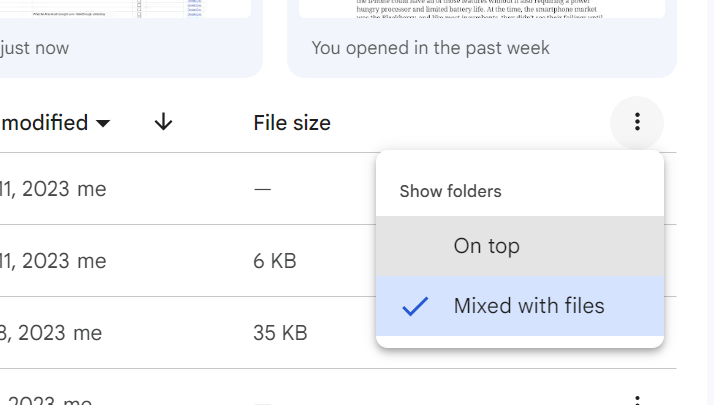
To change how the folders are shown, click on the three dot menu to the right of the column headings.
Leaving folders at the top is how it has been, and how folders are listed when used under Windows. However, by selecting mixed with files, you'll get a view similar to how macOS lists files and folders, mixing the folders in with the files.
Google Slides
Collaborative cursors are coming to Google Slides! When this feature is enabled, each person on a collaborative slide deck will have a cursor. This makes Slides work a lot like Docs and Sheets where you can see what others are doing in your document.
Each collaborator has control over whether their cursor is shown. To turn it on, go to View > Live Pointers > Show My Pointer menu item.
There is also a menu item to show all your collaborator cursors, View > Live Pointers > Show Collaborator Pointers. This feature is currently rolling out to all users, so if you don't have it yet, you should get it by October 18th.
Practice your typing with Ztype
The typing game ZType is a pretty good looking and fun way to practice typing. Students can play the game with the built in word list, or word lists can be added. A neat way to practice typing and learning new words.
Learn21 Update
In an era where information flows constantly and media pervades our lives, the need for media literacy has never been more critical. This summer, the Learn21 team presented a series of webinars on Media Literacy as part of the ISTE Community Leaders series. These webinars focused on laws, trends, and best practices in three regions of the United States: West Coast, East Coast, and Central/Mountain, illuminating the path to a more media-savvy generation.
Centered around a common definition for media literacy, "Critical Media Literacy expands literacy to include mass communication, popular culture, and new technologies, allowing critical analysis of media's role in information and power” (Keller & Share, 2007, p.2), these webinars outlined the need for schools to infuse these concepts in all areas of instruction.
The webinars featured a state-by-state assessment of legislation on media literacy education in K-12 schools, shedding light on the current landscape. Trends in media literacy, such as critical analysis of media messages and visual and social media literacy, were discussed, emphasizing the need to adapt to the evolving media landscape.
For educators, the webinars offered recommendations to impart media literacy skills effectively, including source reliability, fact-checking, and integrating media literacy across subjects. Educators were encouraged to monitor students' well-being in relation to media literacy, addressing emotional responses and ensuring responsible media use.
To stay updated on legislative changes and access resources, Learn21 introduced their first of its kind resource outlining the legislation present and pending in each state. These webinars represent a significant step towards a more media-literate society, equipping both educators and students to navigate the world of media with discernment and confidence.
Even if you missed the live sessions, you can view the recordings here!
Extra Credit
Good news for our younger students, you may never have to fill out a scantron form! Before you get too excited, it's not that the multiple choice question is falling out of favor, it's just that students will be more likely to take the test electronically than using the old reliable #2 pencil.
What if it wasn't just technology that killed cursive handwriting and it was actually the ballpoint pen?
The creators of ChatGPT, OpenAI, have posted that AI writing detectors don't work, but that's not going to stop people from working on AI detection. More importantly, it's not going to stop students from figuring out how to get past AI detectors.
The Ig Nobel prizes celebrates offbeat but practical research, and the list of 2023 winners has been released. This year's awards went to research into why geologists lick rocks, whether there is an equal number of hairs in each nostril, and more. The education category looked into boredom and the effects of a teacher's boredom with the lesson along with the anticipated boredom of a lesson.
After all of the press about Chromebooks end of life, Google is now offering ten years of updates for Chromebooks released after 2021. Ten years is a mighty long time in the technology world, I think they'll be less useful way before 2030.
Bytes and Insights is written by Eduk8me’s Ryan Collins who writes about education and educational technology. He’s also the Director of Technology for Kenton City Schools in Ohio. Sign up for his Of Bits and Bytes newsletter at https://eduk8.me.