
Learn21 Update: Empowering K-12 Schools with AI: Learn21's Innovative Services
In the rapidly evolving landscape of education, generative artificial intelligence (AI) offers transformative potential for K-12 schools. Learn21 stands at the forefront of this revolution, providing a suite of AI services designed to enhance educational experiences, boost productivity, and ensure AI literacy for students and educators, all while keeping an eye on privacy and security! Our work is also grounded in peer reviewed research on the use of AI in education (check out our video series at Learn21.org/blog). Here's a closer look at how Learn21 is helping schools seamlessly integrate AI into their systems.
Tailored AI Strategic Planning
At the core of Learn21's offerings is their comprehensive AI strategic planning and policy development services. Recognizing that each school or district has unique needs and goals, Learn21 facilitates planning sessions that help educational leaders identify specific objectives, allocate resources effectively, and develop a detailed roadmap for AI integration. This strategic approach ensures that AI adoption is aligned with the school’s mission and educational goals, promoting a seamless and effective implementation.
Engaging AI Workshops for Educators
Understanding that the successful integration of AI in education hinges on teacher readiness, Learn21 offers engaging workshops for K-12 educators. These sessions provide hands-on experiences and practical insights into AI applications within the classroom. Educators learn how to leverage AI tools to enhance their teaching practices, personalize student learning, and foster a future-ready classroom environment. These workshops are designed to demystify AI and equip teachers with the confidence and skills needed to integrate AI into their daily teaching routines.
AI Campground: A Unique Learning Experience
One of the standout offerings from Learn21 is their AI Campground program. This innovative initiative allows teachers and staff to engage with AI in a collaborative and exploratory environment. Schools or districts can host these campgrounds, where educators have the opportunity to play with AI tools, collaborate with colleagues on integration strategies, and develop new skills. The AI Campground fosters a spirit of innovation and collaboration, helping educators feel more comfortable and competent in using AI technologies.
Professional Development and Community Engagement
Learn21’s commitment to AI integration extends beyond the classroom to involve parents and the broader community. Our professional development programs ensure that all stakeholders, including administrators and central office staff, are well-versed in AI applications and benefits. Additionally, Learn21's parent and community engagement programs foster a collaborative spirit, supporting students' AI learning both at school and at home. These programs are crucial for building a supportive school that champions the educational advancements AI can bring.
Expert Guidance and Trusted Partnerships
With a team comprising experienced teachers, administrators, and tech directors, Learn21 brings a wealth of practical knowledge to our AI services. This expertise ensures that our AI solutions are not only theoretically sound but also practically applicable. Furthermore, as a state alliance for the Student Data Privacy Consortium (SDPC) and a state chapter for the Consortium of School Networking (CoSN), Learn21 is deeply committed to student data privacy and security. We routinely lead webinars, conferences, and panels on student data privacy and cybersecurity, providing schools with trusted guidance in these critical areas.
Learn21's AI services for K-12 schools offer a comprehensive approach to integrating artificial intelligence in education. From strategic planning and professional development to hands-on workshops and community engagement, Learn21 equips schools with the tools and knowledge needed to harness the power of AI. Our focus on data privacy and their deep expertise make us a trusted partner in this transformative journey. As AI continues to evolve, Learn21 is dedicated to helping schools navigate and leverage these advancements, ensuring that educators and students are prepared for the future.
For more information on how Learn21 can assist your school in integrating AI, contact us at engagements@learn21.org
Video 7: Fostering Deeper Cognitive Engagement
To further support educators in integrating AI into their teaching practices, Learn21 has developed our video series "Turning Research into Practice: Leveraging Generative AI in K-12 Education." This series explores the future of education through the lens of generative AI, providing research-based insights and practical applications for K-12 schools.
Each 10-minute video in the series addresses key topics such as prompt engineering, AI's integration with pedagogical strategies, and the impact of AI in various learning environments. The series aims to answer pressing questions educators and administrators face today, from harnessing AI to empower teachers to fostering deeper cognitive engagement and promoting critical thinking among students.
Introducing Video 7: Fostering Deeper Cognitive Engagement with AI
The seventh video in this series, "Fostering Deeper Cognitive Engagement," delves into how AI tools can be utilized to challenge students intellectually and promote active, deep learning processes. It highlights strategies for using AI to create learning experiences that engage students at a higher cognitive level, encouraging them to think critically and creatively.
Summary of Video 7:
- Question Addressed: How does AI encourage deeper cognitive engagement?
- Key Points:
- AI's role in creating intellectually stimulating learning environments.
- Techniques for using AI to foster critical thinking and deep learning.
- Examples of AI applications that challenge students to engage more deeply with content.
This video, like the rest of the series, is grounded in current research and offers actionable strategies for educators looking to leverage AI to enhance teaching and learning outcomes.
For more information on how Learn21 can assist your school in integrating AI and to access the full video series, visit www.learn21.org or contact us at engagements@learn21.org.
The Google Chrome Omnibox: An Essential Tool for Educators
The Google Chrome Omnibox, commonly known as the address bar, is a versatile tool embedded at the top of the browser interface. It goes above and beyond the traditional role of directing users to web addresses by incorporating additional functions such as search engine integration, calculations, conversions, and much more. For educators, the Omnibox can serve as an invaluable resource, enhancing the efficiency and interactivity of classroom activities.
Key Functionalities of the Omnibox
- Web Search: Users can enter search queries directly into the Omnibox, bypassing the need to navigate to a search engine homepage. This feature simplifies the process of finding information quickly.
- Calculations and Conversions: The Omnibox can handle basic arithmetic operations and unit conversions. For instance, entering 34 * 87 or 10 USD to EUR yields immediate results, eliminating the need for external tools.
- Weather Updates: Typing weather [city] provides instant access to weather forecasts, making it convenient to stay informed about current conditions.
- Definitions: Educators and students can look up word definitions by typing define [word] facilitating quick comprehension of unfamiliar terms.
- History and Bookmarks: The Omnibox suggests relevant sites from the user's browsing history and bookmarks based on partial entries, aiding in faster navigation.
- Site-Specific Searches: Users can search within specific websites directly from the Omnibox. Typing the website name followed by pressing the Tab key allows for targeted searches, such as youtube [search term] for YouTube videos. You can also use the site:SPECIFICSITE.COM to limit searches to the specificsite.com website.
- Flight Updates: Need to see when a flight lands? Just type in the airline two character code and the flight number for the latest status. For example AA 1492 gets you flight details on American Airlines flight 1492 from Columbus, OH to Dallas, TX (we see what you did there, American).
And all of these features are in addition to the Google tools such as typing 5 minute timer for a 5 minute timer or calculator to bring up a calculator.'
Conclusion
The Google Chrome Omnibox is a powerful tool that extends far beyond its primary function as an address bar. By incorporating a range of functionalities such as instant search, calculations, conversions, and more, it enhances both teaching and learning experiences. Educators can utilize the Omnibox to access information quickly, perform essential tasks, and foster digital literacy among students. Embracing the capabilities of the Omnibox can lead to a more efficient and interactive classroom environment, ultimately enriching the educational process.
Tips and Tricks
Adding a Custom Search Engine to Google Chrome for Educator Resources
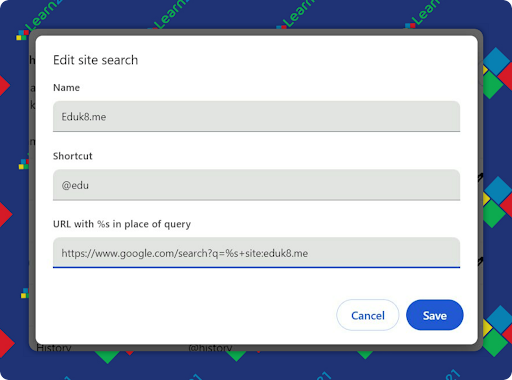
Enhance your browsing efficiency by adding a custom search engine to Google Chrome, allowing you to quickly search specific sites directly from the Omnibox. If you have a favorite edtech site or sites that you would like to search, you can add a search engine that will use Google to search only those sites. Here’s a step-by-step guide on how to set up a custom search engine for searching educator resources on eduk8.me using the keyword @edu.
Step-by-Step Instructions:
- Open Chrome Settings:
- Click on the three vertical dots in the upper right corner of your Chrome browser.
- Select "Settings" from the dropdown menu.
- Manage Search Engines:
- In the left-hand menu, click on "Search engine."
- Click on "Manage search engines and site search."
- Add a New Search Engine:
- Scroll down to the "Site search" section.
- Click on "Add" next to "Site search."
- Enter Search Engine Details:
- Search engine: EduK8.me Resources
- Shortcut: @edu
- URL with %s in place of query: https://www.google.com/search?q=%s+site:eduk8.me
- Save Your Custom Search Engine:
- Click "Add" to save your new custom search engine.
Using Your Custom Search Engine:
To use your new search engine, simply type @edu followed by your search query directly into the Omnibox. For example, typing @edu classroom management strategies will search for classroom management strategies specifically on eduk8.me.
Expanding on custom searches
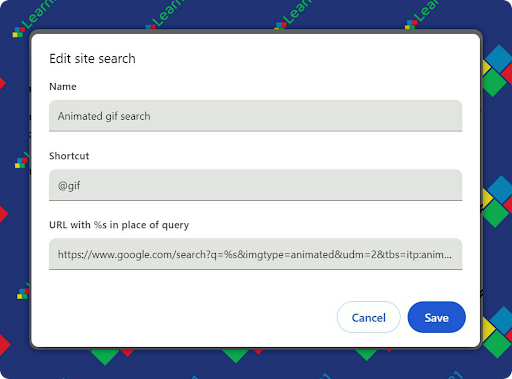
When creating a custom Google Search, you can use any feature of Google search. For example, you can use the following URL to create a Google Animated Gif search:
ihttps://www.google.com/search?q=%s&imgtype=animated&udm=2&tbs=itp:animated
Add the search provider with the following settings, and then you can use @gif in the Omnibox to search Google Images for animated gifs.
Removing the AI generated results from Google
This past week Google added a setting to remove the AI overviews and other cruft, but buried it in the tools menu. Luckily, you can set this as your default Google search with a custom search engine.
By setting up a custom search engine, you can streamline your search process, making it quicker and easier to find relevant educational resources. This feature is especially useful for teachers looking to access specific content from trusted websites efficiently.
Extra Credit
Using vague language in scientific reporting, such as "scientists believe," can mislead readers by making facts appear as opinions. A Stanford University study found that using subjective verbs like "believe" leads people to view factual issues as matters of opinion, reducing the perceived truthfulness of statements. This practice in media can contribute to the rise of "post-truth" politics and the spread of "alternative facts," undermining public acceptance of scientific evidence.
Explore the fun and educational video series "Fun with Google A-Z: LaunchPad" by Cammie Kannekens, featuring creative activities and tools from Google. From Autodraw and Blob Opera to Geoguessr and Google Keep, this series offers engaging videos and resources perfect for K-12 classrooms. Whether you're tech-savvy or just getting started, these bite-sized lessons will inspire both teachers and students to make the most of Google's innovative tools.
Khan Academy and Microsoft are teaming up to expand access to AI tools designed to personalize teaching and make learning more engaging. This partnership will provide K-12 teachers across the U.S. with free access to Khanmigo for Teachers, an AI-powered assistant that offers creative lesson plans and administrative support, helping to save teachers time and reduce burnout. By integrating AI tools like Khanmigo, teachers can enhance their lessons, cater to individual student needs, and make learning more interactive and fun. This collaboration aims to bring high-quality, scalable educational experiences to more classrooms, empowering teachers and students alike.
🙋♂️ Bytes and Insights is written by Eduk8me’s Ryan Collins who writes about education and educational technology. He is also the Director of Technology for Kenton City Schools in Ohio. Sign up for his Of Bits and Bytes newsletter at https://eduk8.me!