
Unleashing the Power of Instructional Design with Learn21
At Learn21, we are dedicated to empowering K-12 educators with innovative instructional design solutions that cater to the diverse needs of students. Our comprehensive range of services is meticulously crafted to support teachers, administrators, and tech directors in delivering impactful and engaging learning experiences.
Engage With Learn21
We’ve Got Your Back! As a team of experienced teachers, administrators, and tech directors, we bring practical expertise to help educators implement effective instructional strategies. Our unique blend of classroom experience and edtech expertise ensures we provide solutions that are both practical and impactful.
Expert Experience: As an industry leader in instructional design, Learn21 regularly leads webinars, conference presentations, and panels on best practices to enhance student learning. Many of our team members are certified ISTE educators, CoSN CETLs, or UDL certified ensuring a high standard of expertise and knowledge in our offerings.
Trusted Partners: Just look at some of the national organizations we represent in Ohio:
- ISTE Affiliate,
- Student Data Privacy Consortium (SDPC) Alliance,
- Consortium of School Networking (CoSN) Chapter, and
- State EdTech Directors Alliance (SETDA) Affiliate.
These are the leading organizations dedicated to advancing student learning and data privacy and we are proud that they trust Learn21 with advancing their missions.
Custom Engagements: We tailor our services to meet the unique needs of each school and district with which we work. By approaching every engagement as an opportunity to address specific educational challenges, we ensure our solutions are customized for maximum impact.
Our Instructional Design Services
Course Design: Our course design service involves the meticulous crafting of educational programs. We combine pedagogical expertise with innovative approaches to create engaging and effective learning experiences that captivate students and enhance learning outcomes.
Lesson Design: Focusing on the granular details of individual lessons, our lesson design service employs learner-centric methodologies, Universal Design for Learning (UDL), and interactive elements. This ensures optimized comprehension and retention for all students.
Strategic Planning: Learn21’s strategic planning service offers a forward-thinking approach to educational initiatives. We align goals, resources, and timelines to create a cohesive and impactful learning environment, ensuring schools are prepared for future challenges.
Auditing Current Online Classes: Our auditing service provides a thorough evaluation of existing online courses. By assessing the instructional design, content delivery, student engagement, and technology integration, we identify areas for improvement and offer actionable recommendations. This ensures that your online classes meet the highest standards of educational quality and effectiveness.
Conferences: From conceptualization to execution, our conference planning service ensures seamless events. We foster collaboration and knowledge exchange among educators through carefully curated content and logistics, enhancing professional development and networking opportunities.
Technology Integration: Incorporating cutting-edge tools and platforms, including generative AI, into educational frameworks is our specialty. Learn21 helps prepare students for digitally-driven learning by enhancing the learning experience with the latest in educational technology.
School Design: Our innovative school design service tailors virtual learning environments to optimize engagement and outcomes. We leverage research-backed pedagogy to create learning spaces that support effective teaching and student success. Did you know our team has helped to design some of the most recognized schools in the U.S.
Contact us at engagements@learn21.org or visit our website www.learn21.org to learn more about how our instructional design services can benefit your educational community. Together, let's create learning experiences that inspire and engage every student.
Exciting New AI Video Release: Prompt Engineering and Critical Thinking
Get ready for our latest AI video release this Thursday, focusing on "Prompt Engineering and Critical Thinking." Join Carly, Erica, and Stacy as they dive into how thoughtfully designed AI-generated prompts can stimulate critical thinking and foster deeper cognitive engagement in educational environments. Discover the theory behind these innovative practices and learn practical techniques to effectively integrate AI in your teaching. Don't miss out on this insightful session that promises to transform your approach to digital education!
Managing Your Browser Extensions
One great feature of the Google Chrome browser (and its close relatives like Microsoft Edge) is the ability to add extensions. Extensions are small software programs that can enhance and customize your browsing experience. However, it's important to manage them wisely, as some can significantly slow down your browsing speed.
The Chrome Extension Performance Lookup website allows you to look up your favorite extensions and see what effect they have on the performance of your browsing sessions. It’s amazing how much some extensions slow things down.
What can you do about these problematic extensions?
Unfortunately, there isn’t much you can do about the extensions that you really want or need to use, without sacrificing their functionality. However, there are a few steps you can take to ensure they don't significantly impact your browser performance.
- Turn off extensions you don't use often: If you have extensions installed that you rarely use , consider disabling or even removing them entirely.
- Choose lightweight extensions: Not all extensions are created equal. Some are far more resource-intensive than others, so it pays to shop around for lighter, less demanding options that offer similar functionality.
- Keep your browser updated: With each update, browsers often become more efficient and secure. Therefore, keeping your browser updated can improve its performance and make it less susceptible to being bogged down by extensions. New updates often bring optimized codes and improved handling of extensions, effectively reducing their negative impact on the browser's speed.
- Run regular performance checks: Use tools like the aforementioned Chrome Extension Performance Lookup website to check what impact individual extensions have on your browser's performance. An extension that works well today may not tomorrow.
- Prioritize essential extensions: Determine what extensions are essential to your browsing experience and focus on those. If non-essential extensions are causing slowdowns, consider disabling them to prioritize the more crucial ones. It's all about finding the right balance between utility and performance.
- Use extensions sparingly: Remember that every extension you load into your browser consumes resources. So, as much as possible, try to use only the number of extensions that you absolutely need. The fewer extensions you have running, the less cluttered and more efficient your browser will be.
- Reinstall extensions: There may be cases where the extension's performance may deteriorate over time due to too much temporary generated data. In this instance, removing and reinstalling the extension may help to restore its initial performance. This can work as a reset, clearing away any unwanted data or cache that has been collected over time.
Some of the biggest culprits are those extensions that are used for writing and shopping, and these extensions may not have any other comparable extension to switch to. In those instances, you’ll be stuck going into the settings and turning the extensions off when not in use.
Tips and Tricks
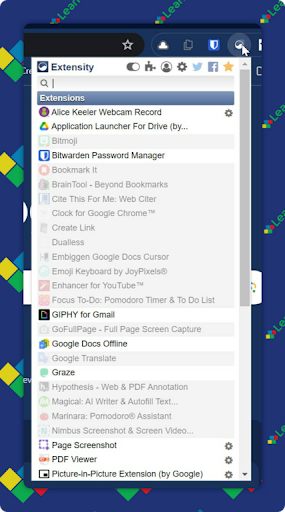
While you can always go into the extension settings to turn extensions off & on or remove them entirely, it’s not a very streamlined process, especially if you are toggling extensions off and on multiple times a day. That’s where, ironically, the Extensity extension can come in handy.
Once installed, you can pin the extension to the toolbar and toggle extensions off and on with two clicks. One click to open the extension and a second click to toggle an extension.
Group extensions by tasks with profiles
Extensity also has the option to create profiles, which can help wrangle those pesky shopping extensions that may save you money at the expense of your time. A profile can be created for shopping, which will turn on the shopping extensions. Another profile can be created for normal browsing that has the shopping extensions turned off.
To create a profile, click on the profile icon in the Extensity extension. Name the profile and click the + to finish creating it. Turn the extensions off or on by checking them. Once done, click Save.
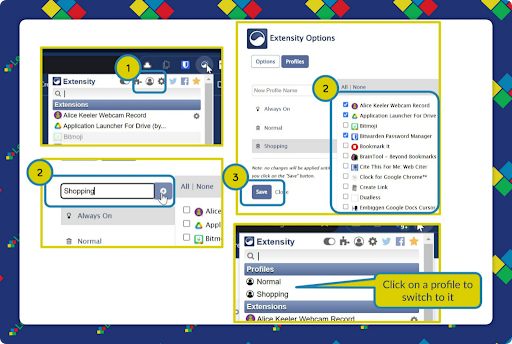
Now the profiles will show when you open the extension, and you can switch to a profile by clicking on it.
The Always On profile allows you to mark extensions that should always be used.
Extra Credit
Google is leaning heavily into the Chromebook Plus branding of Chromebooks for teachers. The latest models from Acer come with improved processors and new tools like “Help me write” for feedback, Google Task and Calendar integration, and advanced video tools for remote learning and meetings. Additionally, Google Admin console will soon include AI-driven features to simplify device management for IT admins and school leaders.
In-person friendships are crucial for better health, offering benefits comparable to a Mediterranean diet. Regular face-to-face interactions with friends, at least once a week, are linked to improved physical and mental health, reducing risks of diseases like heart disease, diabetes, and Alzheimer's. While virtual connections help maintain relationships, they lack the full health benefits provided by in-person contact, which includes shared physical presence, smells, and touch, all of which contribute to lower stress and better immune function.
Microsoft is launching Visual Studio Code for Education at the end of the month, a free, online coding platform with an integrated curriculum and sandbox environment that requires no setup. Designed to work across various devices and browsers, it simplifies learning with a user-friendly interface and includes courses like Python, preparing students for future workplace demands. This platform allows students to start coding immediately, offering an inclusive, streamlined experience that mirrors the popular Visual Studio Code editor.
🙋♂️ Bytes and Insights is written by Eduk8me’s Ryan Collins who writes about education and educational technology. He is also the Director of Technology for Kenton City Schools in Ohio. Sign up for his Of Bits and Bytes newsletter at https://eduk8.me!