
Preparing for a New School Year with Learn21’s SEL Services
As the school year wraps up and you begin to make plans for a new school year, you may be looking for innovative ways to support the well-being of your students and staff. Social Emotional Learning (SEL) is a critical component in fostering a positive, inclusive, and resilient school environment. Learn21 offers personalized and comprehensive SEL services tailored to meet the unique needs of K-12 schools, ensuring a successful and enriching academic year.
Customized SEL Curriculum for Holistic Development
While preparing for the new school year, schools can benefit greatly from Learn21’s customized SEL curriculum. Our curriculum is designed to align with educational standards and tailored to the specific needs of each school district. This ensures that SEL initiatives are not only effective but also relevant and impactful, fostering holistic student development right from the start.
Professional Development for Educators
To effectively integrate SEL into everyday school life, teachers and staff need the right tools and strategies. Learn21 provides engaging professional development opportunities based on the latest research-backed methods. These training sessions equip educators with practical techniques to embed SEL into their interactions with students, creating a nurturing and supportive classroom environment.
Innovative EdTech Solutions for SEL
Incorporating technology into SEL practices can significantly enhance educators' reach and effectiveness. Learn21 integrates educational technology with evidence-based SEL practices, providing innovative EdTech solutions that make SEL more accessible and engaging for students. This integration helps schools prepare students for a digital future while supporting their emotional and social growth.
Strategic SEL Planning for Sustainable Impact
For a cohesive and sustainable approach to SEL, strategic planning is essential. Learn21 collaborates with school districts to develop comprehensive SEL strategic plans that align goals, resources, and timelines. These plans create a strong foundation for nurturing student and staff well-being throughout the school year and beyond.
Adult SEL Services for Educator Well-Being
Recognizing the importance of staff well-being, Learn21 offers specialized SEL services for educators and staff. These programs focus on promoting emotional intelligence, resilience, and overall well-being among school personnel, ensuring a positive and supportive work environment that can handle the challenges of the new school year.
Engaging Parents and the Community
SEL development is most effective when it extends beyond the classroom. Learn21’s programs involve parents and the community, fostering a collaborative spirit that supports students both at school and at home. Engaging parents and community members ensures consistent SEL support for students, helping them thrive in all aspects of their lives.
Expertise and Trusted Partnerships
Learn21 brings a wealth of expertise to every engagement. Our team consists of experienced teachers, school counselors, administrators, and tech directors who provide practical and impactful support. As a state affiliate for the Student Data Privacy Consortium (SDPC) and a state chapter for the Consortium of School Networking (CoSN), Learn21 is also committed to maintaining the highest standards of data privacy and security.
By integrating Learn21’s SEL services into your school’s plans for the new year, you can create a positive and inclusive environment where both students and staff can flourish. Our tailored approach ensures that each school receives the support it needs to implement effective and sustainable SEL initiatives.
For more information on how Learn21 can help you integrate SEL services, visit www.learn21.org or contact us at engagements@learn21.org. If you are an ISTE member you can see some of our work in action. You can view our Expert Webinar "Leveraging Technology to Foster SEL" led by Erica Shumaker and Stacy Hawthorne in November 2023.
Start the new school year with Learn21’s SEL services and make a lasting impact on your school community’s well-being!
Exciting New AI Video Release: Strategies for Cognitive Engagement and Metacognition
Get ready for our latest AI video release this Thursday, focusing on "Strategies for Cognitive Engagement and Metacognition." Join Kimberly, Danni, and Carly as they explore how innovative pedagogical approaches and AI prompt engineering can deepen cognitive engagement and enhance metacognition in online learning. Discover the theory behind these practices and learn practical techniques to integrate AI effectively in your teaching. Don't miss out on this insightful session that promises to transform your approach to digital education!
Present Using Speaker Notes for a More Engaging Presentation
When it comes to delivering an engaging and effective presentation, presenting with speaker notes can make a world of difference.
Presenting with speaker notes is a feature in most presentation software, like PowerPoint, Google Slides or Canva, that displays your slides full screen while the presenter views their notes on a separate screen.
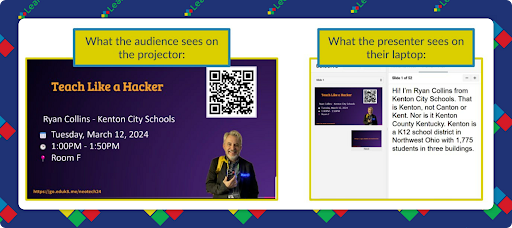
Speaker notes are a private view for the presenter, where you can add additional information, cues, or reminders that aren’t visible to the audience. These notes can be seen in presenter view, a split-screen mode showing your current slide, the upcoming slide, and your notes on your device while the audience only sees the current slide.
Why Present with Speaker Notes?
Presenting with speaker notes allows you to add detailed points, questions to ask the audience, or reminders without cluttering your slides with text. This ensures that your slides remain visually appealing and not overloaded with information.
Having the notes available gives you a safety net to ensure you cover all your points. This can also be particularly helpful if you’re nervous or if the presentation is lengthy.
For students, learning to use these tools can be invaluable. They can read from their speaker notes instead of directly from the slides, promoting better eye contact with the audience and a more natural speaking style. Plus, the students will be less likely to include tons of text on their slides enhancing their presentation skills and confidence.
Requirements for Using Speaker Notes
To effectively use speaker notes, you need:
- Two Monitors or Screens: This setup allows you to display the presentation on one screen and view your notes on the other.
- Spanning Mode: Ensure your monitors are set up as spanning (extended desktop), not mirroring. This configuration enables the presenter view on one screen and the full presentation on the other.
Tips and Tricks
Sometimes creating screenshots isn't enough, but creating a screencast is way too much. In those instances you can create an animated gif with gifcap. This website can create animated gifs of your screen very quickly. With the ease of use comes one big limitation. You can only trim from the beginning or end of your gif, you don't have any other editing tools.
Click on Start Recording to begin recording an animated gif.
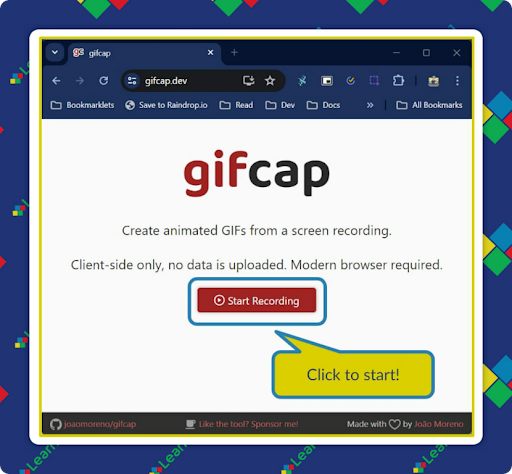
The site will ask what you want to record. Your options are a specific browser tab, a specific window, or the entire screen. I recommend selecting the entire screen.
Next, click the Entire Screen to record and then the Share button, which will share the screen with the website.
The site will start recording. Animated gifs can become very large if you record for a long time, so this works best for short captures. Once you’re done recording, go back to the original tab with gifcap.dev and click Stop Recording.
Your animated gif will begin looping on the site, and at the bottom will be a slider at the start and end of the recording, allowing you to trim from the start and end.
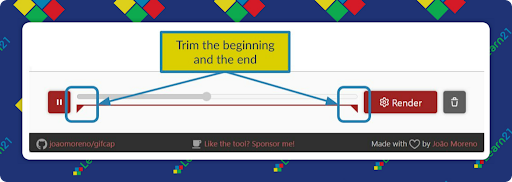
When you’re ready, click Render to download your animated gif.
Extra Credit
John Quincy Adams' struggle with impostor syndrome highlights a universal challenge: feeling unworthy despite evident achievements. While serving as Secretary of State, Adams was unexpectedly elected President of the American Academy of Arts and Sciences. Despite his admiration for arts and sciences, he felt inadequate, revealing a profound lack of self-confidence. His diary entries from 1820 reflect his internal conflict between humility and pride, and his hope to contribute meaningfully to society.
A study by Ben-Gurion University researchers found that people underutilize their visual working memory, typically remembering only one item at a time, even though they can remember 3-4 items. The study suggests that visual working memory capacity is often not fully utilized, impacting everyday tasks.
With the average person holding 12 jobs in their lifetime, cultivating transferable skills is key for career navigation. Transferable skills are those learned in one context that can be applied to various jobs. These include fundamental skills like literacy and numeracy, people skills like communication and teamwork, conceptual skills like problem-solving and planning, business skills, and community skills like cultural awareness. Soft skills, such as leadership and emotional intelligence, are crucial for adapting to change and can enhance earning potential.
🙋♂️ Bytes and Insights is written by Eduk8me’s Ryan Collins who writes about education and educational technology. He is also the Director of Technology for Kenton City Schools in Ohio. Sign up for his Of Bits and Bytes newsletter at https://eduk8.me!