
Empowering Educators with the EdTech Leaders Alliance, ETLA
The EdTech Leaders Alliance (ETLA) is at the forefront of transforming education through technology. As an advocacy group, ETLA is dedicated to equipping educators with the knowledge and skills needed to navigate the evolving digital landscape. By fostering a vibrant community of EdTech professionals, ETLA serves as a hub for collaboration, innovation, and excellence in education. Through its roles as the Ohio CoSN Chapter, ISTE Affiliate, SETDA Affiliate, and SDPC Alliance, ETLA provides invaluable support and leadership opportunities to EdTech leaders across Ohio and beyond. As we continue to redefine educational technology leadership, ETLA remains committed to driving collective growth and fostering innovation within the education sector.
ETLA Conference 2024: Early Bird Pricing Ends Soon!
We are thrilled to invite you to the upcoming EdTech Leaders Alliance (ETLA) Conference, set to take place from Sunday, October 20th to Tuesday, October 22nd, at the Nationwide Conference Center in Columbus, Ohio. This event is a unique opportunity to connect with fellow EdTech professionals, gain insights from industry leaders, and contribute to the future of educational technology.
Register Now and Save $100!
Take advantage of our Early Bird pricing of $250 for the full conference, available until Tuesday, August 20, 2024. After this date, the regular pricing of $350 will apply.
Why Attend?
- Networking: Connect with like-minded professionals and expand your network.
- Professional Growth: Enhance your skills and gain valuable insights from industry experts.
- Impact: Play a role in shaping the future of educational technology in Ohio and beyond.
Event Details:
- When: Sunday, October 20 - Tuesday, October 22, 2024
- Who: CTOs, Tech Directors, Superintendents, Principals, Curriculum Directors, Administrators, Technicians, Emerging Leaders, and EdTech Visionaries
- Where: Nationwide Conference Center, Columbus, Ohio
Don’t miss out on this opportunity to grow and innovate. Register Now to secure your spot at the best rate! Check out our video below to learn more about the conference.
Understanding Ohio Senate Bill 29: DPA Services and Webinar Series
As part of our commitment to supporting schools in navigating the complexities of student data privacy, the ETLA is offering a series of webinars focused on Ohio Senate Bill 29. This bill has significant implications for schools, and our upcoming webinars are designed to provide a comprehensive understanding of its key provisions and requirements.
Join our Student Data Privacy Team as we explore the critical aspects of SB29, including:
- Talking Points of the Bill: A detailed overview of the key provisions and requirements outlined in SB29.
- Impact on Schools: What SB29 means for schools, including compliance obligations and best practices on student data privacy and procuring data privacy agreements.
- Support from ETLA: An introduction to the resources and support available from ETLA to help schools navigate and comply with SB29.
Dates and Times:
- Thursday, September 19th at 9:00 AM - 9:45 AM ET
- Wednesday, September 25th at 9:00 AM - 9:45 AM ET
Don't miss this opportunity to stay informed and prepared. Register Today to secure your spot. We look forward to your participation!
Stay Connected: Sign Up for Our Newsletter
Want to stay updated on the latest in educational technology, upcoming events, and valuable resources? Sign up for our ETLA newsletter to receive weekly updates directly in your inbox. Whether it's news about the ETLA Conference, webinars, or the latest in EdTech trends, our newsletter is your go-to source for staying informed.
Sign Up Now and never miss an update! We look forward to keeping you connected with the EdTech community.
Supercharge Your Classroom Productivity With Spreadsheets
The first killer app for computers was the spreadsheet which has come a long way from its start with Visicalc. Spreadsheets have become an indispensable and powerful tool in various professional fields, and education is no exception. As a teacher, understanding and utilizing spreadsheets can greatly enhance both your teaching methods and classroom management.
What Are Spreadsheets?
At their core, spreadsheets can feel like the game Battleship, storing data in blocks called cells. The cells are arranged into columns and rows, allowing users to organize and analyze data. Programs like Microsoft Excel and Google Sheets offer a wide range of functions, from simple data entry to complex calculations and data analysis.
Enhancing Lesson Planning
Spreadsheets can also be a powerful tool for lesson planning. By organizing your curriculum in a spreadsheet, you can easily map out your lessons, track the progress of your syllabus, and ensure that all necessary topics are covered. Additionally, spreadsheets allow for flexibility, enabling you to adjust your plans as needed and keep a detailed record of what has been taught and what needs to be revisited.
Encouraging Student Engagement
Incorporating spreadsheets into your classroom activities can also boost student engagement. Students can use spreadsheets for various projects, such as tracking their reading progress, managing group project timelines, or even conducting simple data analysis for science experiments. By teaching students how to use spreadsheets, you equip them with valuable skills that they can use in their academic and professional futures.
Spreadsheets are a versatile and powerful tool that can significantly enhance your teaching and classroom management. By leveraging their capabilities, you can streamline administrative tasks, plan lessons more effectively, use data to inform your instruction, and engage students in meaningful ways. Embrace the power of spreadsheets and transform your classroom into a more organized and dynamic learning environment.
Tips and Tricks
Managing Information in a Spreadsheet
One huge help in the classroom is creating a spreadsheet (or sheets, depending on how many preps you have) that contains a class list and auxiliary information about the students. Once the information is in the sheet, it saves time and energy when you need a class list or other class information for other purposes.
A Common Mistake
One mistake I see people do with spreadsheets is to combine two distinct pieces of data into one column. For example, combining first and last name into one column. Keeping these in separate columns gives you much more flexibility down the line.
Quickly Create a Checklist
Are you planning a big project? Or maybe need to collect multiple pieces of information from students for an upcoming field trip? That's where a checklist can come in handy (assuming you SIS doesn't have this feature).
Open up your student information sheet and highlight the columns of information that you want to include in your checklist. Click and drag across those columns, and then use Edit -> Copy. Now create a new spreadsheet, click in cell A1 and use Edit -> Paste. Enter what additional information you need in the other columns:
Convert those cells to checkmarks if your spreadsheet software allows you to, if not, you can use a capital X to designate crossed off items. Now you can not only easily check things off, but you can also notify those students and or parents (if you had their email address) with a simple copy & paste. Sort the column, which will group the checked and unchecked, then you can select the unchecked students and paste those addresses into an email to notify them.
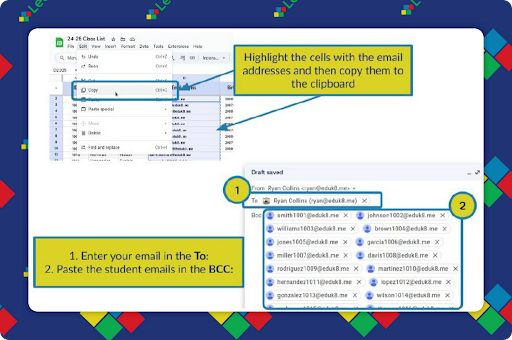
Bonus tip: When sending to a group, enter the addresses into the BCC: field. You still need at least one address in the TO: field, so I put my email address there. With the other emails in BCC: you don't have to worry about Reply All or sharing student or parent emails with the whole class.
Extra Credit
John Spencer’s latest article highlights seven fab ways to spark student curiosity, from revamping direct instruction with ask-pair-answer activities to embracing peer-to-peer questions and even launching full-blown inquiry-based projects. Whether you’re keen on Ted Lasso quotes or wondering about goldfish memory spans, it’s all about making curiosity a habit.
OpenAI has been secretly working on a way to watermark ChatGPT's text, which would make it super easy to catch students using AI for their essays. But they can't decide whether to unleash it because it might scare off users and mess with their profits. Plus, students could just paraphrase to dodge the system anyway.
The pandemic had many of us trying out new hobbies like knitting and baking, and although we often failed at first, we eventually improved. This "Beginner's Mindset" is similar to founding a business with little initial funding. It teaches us to tinker, experiment, and learn new skills—all in a low-pressure environment. Something to think about the next time you consider trying something new (or teaching your students to).
Register for ETLA Conference
Early Bird Pricing ends August 20th!
🙋♂️ Bytes and Insights is co-authored by Eduk8me’s Ryan Collins who writes about education and educational technology. He is also the Director of Technology for Kenton City Schools in Ohio. Sign up for his Of Bits and Bytes newsletter at https://eduk8.me!