
Five Reasons I am Excited to go Back to School
by Carly Ghantous, Learn21 Education Change Agent and Davidson Academy Online English Instructor
The narrative around teaching has been decidedly negative lately, with news outlets highlighting teachers leaving the classroom, potential strikes, and growing concerns about teacher shortages. Despite all this, I can’t help but feel a surge of excitement as the new school year approaches. I’m thrilled to be returning to my post as a middle and high school English teacher. So, what’s got me so jazzed about going back to school? I’m glad you asked! Here are my five reasons to be excited for the upcoming school year:
1. A Fresh Start for Everyone
Every new school year is a blank canvas—not just for students but for teachers, too. It’s a chance to try out fresh ideas, refine our approaches, and set new goals. One of my favorite end of summer tasks is designing the learning space for my students. As a virtual teacher, I love working with graphics and creating a welcoming space that is filled with a sense of possibility (and color!) as we return to school. That energy is electric, reminding us that growth and improvement are always within reach.
2. Building New Relationships
Building relationships with our students is an extremely rewarding aspect of teaching, and the reason why many of us joined the profession. Each year brings a new group of young people, each with their own unique personalities, challenges, and potential, and it’s important for us to remember the excitement that comes with this opportunity. I’m looking forward to getting to know my students, learning about their interests, and creating a supportive community where everyone feels valued and heard.
3. The Joy of Learning Together
Teaching is about more than just passing on knowledge; it’s about learning alongside our students. Those “aha!” moments when a concept clicks are pure gold, and I’m just as eager to experience those moments myself. Whether it’s discovering a new way to explain a concept, finding the coolest new digital tool, or learning something unexpected from my students, the joy of learning is truly contagious.
4. A Chance to Innovate
The start of a new year is the perfect time to experiment with new teaching methods and technologies. This year, I’m particularly excited about integrating Genial.ly into my lessons to create more interactive learning experiences and using Perusall for collaborative annotations. These tools offer endless possibilities to engage students in dynamic, meaningful ways, and I can’t wait to see how they enhance our classroom environment and lead to deeper learning experiences.
5. Reconnecting with Colleagues
One of the best parts of teaching is the sense of community among educators. While we all collectively loathe professional development meetings that mark the start of the new school year, the relationship development that happens when we get back together after a summer apart is unmatched. I find myself eager to reconnect with my colleagues, share experiences, and collaborate on new ideas for the year ahead. The camaraderie and support we provide each other are invaluable, and I know that together, we can tackle any challenges that come our way.
As I gear up for the new school year, I find myself filled with optimism and enthusiasm, not dread and despair. Sure, teaching has its challenges, but the rewards far outweigh them, which is why I am happily looking forward to returning to the classroom for another year. I can’t wait to make a difference and help my students reach their full potential. Here’s to a fantastic year ahead!
EdTech Leaders Alliance Update
Don't forget to Register for ETLA Conference! Check out our line up of sessions, keynote speakers, and social events. You will not want to miss this year's conference!
ETLA Newsletter The Vibe: Last week we shared a link to sign up for to receive the ETLA newsletter and ETLA Updates. Unfortunately, there was a glitch with the link. Please use this non-glitching link to receive all the ETLA news!
We're excited to announce that the ETLA Website is live!! Check it out and pay special attention to our Upcoming Events. We'd love to have you join one or two.
Advancing Your Spreadsheet Skills
Sure, we can talk about using spreadsheets, but what are some of the essential skills to know when working in spreadsheets? Well, first and foremost, you need to understand the basic functionalities of spreadsheets like creating, saving, and opening a spreadsheet document, entering data into the cells, and navigating through the spreadsheet. However, to truly get ahead, other skills also matter.
Cell References
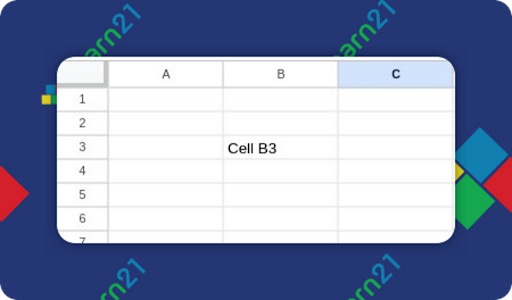
If you’ve ever played the game Battleship, you’ll feel right at home in a spreadsheet. A cell is a box on a spreadsheet. Each cell has an address referenced by the column and the row, in that order. The cell B3 is in the second column, 3rd row down.
Formulas and Functions
Knowing how to use formulas and functions is imperative. This skill allows you to perform calculations and manipulate the data in the spreadsheet. Among the most commonly used functions are SUM, AVERAGE, or VLOOKUP.
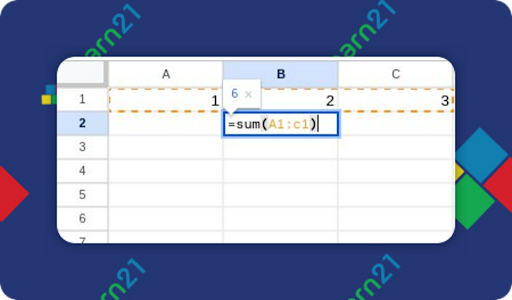
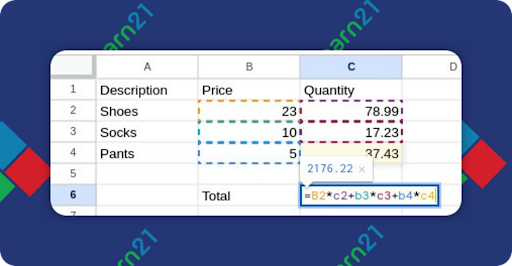
A cell in a spreadsheet can contain data or a formula. Formulas are what make spreadsheets so powerful, as they enable calculations. Formulas start with an equals sign (=), followed by a function name (like SUM or AVERAGE), and the cells to be calculated enclosed in parentheses. For example, to calculate the sum of data in cells A1 through A5, you would enter the formula =SUM(A1:A5) in the appropriate cell. A range of cells are separated by a colon.
A formula in a spreadsheet can use one or more functions, plus any data or data from other cells. Here is an example where a formula calculates the total cost of all of the items:
Data Extraction and Cleaning
Real world data is often messy and needs to be cleaned before it can be analyzed effectively. Learn how to use tools like Find and Replace, data sorting, and filtering to clean up and structure your data. Understanding how to manipulate data to make it work for your needs is an essential skill.
Let’s say you have your students’ first names and last names in a spreadsheet, and you’d like to create a list of their email addresses. This is possible because the student email addresses follow a pattern of the last two digits of their grade year, a period, their last name, a period, and their first initial. A student in 4th grade this year with the name Luke Skywalker would have an email address of 33.skywalker.l@myschool.org. If A1 has the student’s last name and A2 their first name, we can use some functions to create their email address.
="33."&A1&"."&left(A2,1)&"@myschool.org"
The = starts the formula, and we add the first part of their email address, the grad year followed by a period. This is in quotes because it is regular text. Next we use the & to concatenate the pieces of information, in this case, grabbing whatever is in A1. Next, add the period that is between the last name and first name, which is done with the ".". Now we need the first initial. If we put A2 in the formula, we will get the entire first name. However, there is a function called left() which will return characters from the left. Functions take parameters, and the left() function takes the data and then the number of characters. In our example, it’s taking whatever is in A2 and returning only one character. Finally, we use one more & to add the text @myschool.org to the end. The text is surrounded by quotes.
Adding more functions
If you are following along and used our sample data, you’ll notice your email address looks like 33.Skywalker.L@myschool.org. Upper and lower case don’t mean anything to email servers, but it does look nicer if the whole thing is lowercase. We can do that by wrapping our current formula with the =lower() function. The lower function takes one parameter, the text to set to lowercase.
Our final formula looks like this:
=lower("33."&A1&"."&left(A2,1)&"@myschool.org")
Congratulations! You’re now a programmer!
Moving on
There are many, MANY, functions to learn when working with spreadsheets. Most functions work the same across the various spreadsheet apps, but be aware that some may be specific to one app and not available in another. Their required parameters or operations may differ, so if you are jumping between Google Sheets and Excel, it is imperative to know what’s different.
Refer to your spreadsheet’s help documents or look them up on the internet to verify the function you want to use is available and to make sure it works the way you want it to.
It may seem daunting at first, but the work is worth it in the end.
Extra Credit
In an effort to curb AI cheating, ISTE Community Leader and Professor Laurel Aguilar-Kirchhoff has re-imagined her assignments, turning traditional midterm essays into storyboards and revamping discussion forum posts, finding the new methods to be more effective. AI detectors don’t work, so by focusing on creative, meaningful projects instead of relying on unreliable detection tools, educators can better adapt to the evolving landscape and maintain integrity in their classrooms. This approach not only mitigates AI misuse but helps make the classroom more exciting.
Is screen time a creativity killer or booster? The article looks into intriguing questions and discovers that it's all about balance. Psychiatrist Dr. Srini Pillay suggests that a mix of focus and 'unfocus' can spark creativity, with many artists finding that breaks for daydreaming or engaging in mindless activities can help. Artists like Maya Beverly and Timothy Lai reveal that while screen time can be distracting, it can also provide valuable resources and inspiration, as long as boundaries are set. In essence, it's not about avoiding screens but using them wisely to foster a creative spark without getting lost in the noise.
Kids are remarkably perceptive and pick up on much more than we realize. They're attuned to our attitudes towards partners and caregivers, noting subtle cues and comments which can affect their sense of security. They also observe how we view our own bodies and interpret our body language, which can shape their self-image. Children notice what we truly value through our actions and behaviors, despite what we might verbally preach, and they mirror our self-compassion or lack thereof. Additionally, kids pay close attention to our relationship with food, internalizing our attitudes towards it, and they are sensitive to how we talk about them to other adults, impacting their self-esteem and our relationship with them. Thus, being mindful of our actions and words can positively influence their development and well-being.
🙋♂️ Bytes and Insights is co-authored by Eduk8me’s Ryan Collins who writes about education and educational technology. He is also the Director of Technology for Kenton City Schools in Ohio. Sign up for his Of Bits and Bytes newsletter at https://eduk8.me!