
Gifted Education and Technology: Empowering Learner Agency with Flexibility and Rigor
Students with high potential thrive in environments that combine intellectual challenge with the freedom to pursue their interests. Striking this balance requires not only robust instructional design but also the strategic use of technology to foster learner agency—a key accelerator identified by CoSN’s Top Topics Driving K-12 Innovation in 2025. Learner agency emphasizes giving students autonomy, voice, and choice in their educational journey, making it particularly impactful for learners identified as gifted.
Technology as a Catalyst for Learner Agency
Technology plays a pivotal role in supporting learner agency by enabling personalized and adaptive educational experiences. It allows learners, especially those identified as gifted, to take ownership of their education, pursuing topics and challenges that align with their interests and intellectual capabilities. By providing tools that prioritize flexibility, technology supports the unique pacing and depth of study that highly curious students require.
At the same time, technology ensures that rigor is maintained. With well-designed systems, educators can set high expectations while allowing students to navigate their pathways toward meeting those goals. The interplay of autonomy and structured guidance ensures that learners remain engaged and motivated.
Encouraging Collaboration and Communication
Engagement is a key driver of meaningful learning experiences for students identified as gifted. Technology provides avenues for collaboration, creativity, and critical thinking that deepen understanding and foster growth. It encourages learners to take initiative, reflect on their progress, and adapt their approaches to achieve mastery. This iterative process is fundamental to both learner agency and academic rigor.
Providing Flexibility Without Compromising Rigor
Flexibility in gifted education does not mean a lack of structure. Rather, it means creating opportunities for students to shape their learning paths while ensuring rigorous academic standards are met.
Looking Ahead: Technology’s Role in a Personalized Future
As technology evolves, its role in supporting neurodivergent learners will expand, enabling ever more personalized and engaging learning experiences. By embracing innovations that prioritize learner agency, educators can help students identified as gifted not only meet but exceed their potential, equipping them with the skills they need to thrive in a rapidly changing world.
For educators and administrators seeking to deepen their understanding of how technology can transform K-12 education, CoSN’s report provides essential insights. By integrating these innovations thoughtfully, we can ensure that gifted education remains flexible, rigorous, and profoundly impactful.
A Whole Lotta Fun in This Holiday Activities Round Up
Brad Dale over at Time to Talk Tech offers tips on adding a splash of the holidays and wintertime to Canva presentations, cards, or digital decorations. He walks through the steps of finding holiday and winter themed elements (including a falling snow animation) to any Canva creation.
A lot of people look forward to their personalized Spotify Wrapped being released, and the concept is a great way to add a little bit of flair to classroom activities. Spotify Wrapped is an animated report of a person’s listening habits on Spotify throughout the year, featuring such stats as the most listened to artist and album. To use this concept in the classroom, Ditch That Textbook has released a Spotify Wrapped-inspired "Recap" template, which allows educators to tap into this engaging summary format to capture students' learning experiences. By utilizing platforms like Google Slides, PowerPoint, or Canva, teachers can go beyond music and allow students to summarize their academic journeys. (Note, we are not recommending the actual use of Spotify with students due to data privacy reasons.)
The "Recap" template is adaptable, allowing students to use it in various subjects and personal insights, making it useful across multiple lesson types such as a "Year in Review" or "All About Me" project.
Peggy Reimers on the TCEA TechNotes Blog offers five ideas that are perfect for the winter season. These activities include vocabulary work with the Canva slide deck "Wintry Words", a "Connections Game" utilizing Flippity that mimics the New York Times’ online game, and a two-part activity titled "Winter Celebrations Around the World" that takes your class on a world wide tour of diverse winter traditions ending with a digital escape room challenge.
Peggy also shares a previous blog post that includes additional seasonal activities, including Winter Trivia, Vanishing Vowels, and the creative challenge of "Putting a New Spin on The Twelve Days of Christmas."
Tips and Tricks
QR codes are a great way to let others quickly open a website. All a QR code does is store textual information and direct users to this information on a web site. But for something so simple there seems to be a lot of friction that has built up over creating them. Doing a search for “QR code creator” starts you off with a ton of sites to which you get to play my not-so-favorite game, “Scam or Fam?”
While some of these sites are great and work as advertised, some of them are not so hot. The worst offenders are those that don’t encode the destination website but instead encode their website which then forwards the user to the destination. This allows the website to track every single person that uses your QR code.
Don’t worry though, here are a couple of very safe ways to create QR codes.
Google Chrome and Microsoft Edge
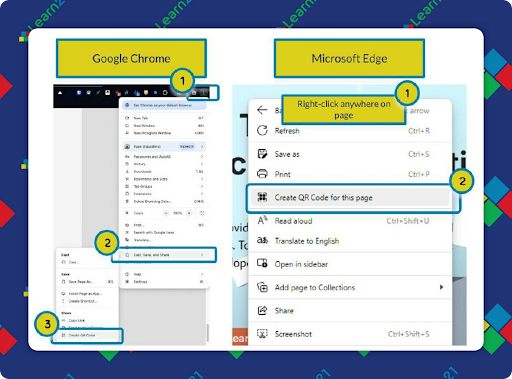
Google Chrome and Microsoft Edge have a QR code creator built into the browser.
- Google Chrome: Click on the three dot menu. Go to Cast, Save, and Share ➡️ Create QR Code
- Microsoft Edge: Right-click anywhere on the page and select Create QR Code for this page
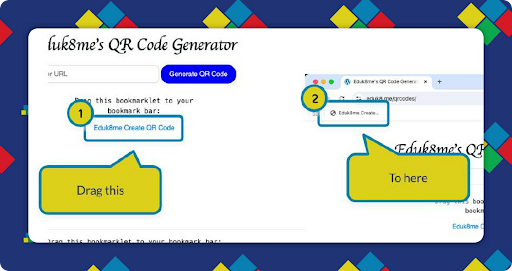
Eduk8me QR Code Creator - Website or Bookmarklet
In my district I have had complaints about the Google Chrome QR code creator because of the dinosaur it places in the middle. One day I sat down with ChatGPT and wrote the Eduk8me's QR Code Generator
The tool runs completely in your browser, no information is transmitted anywhere.
There are two ways to create a QR code:
- Visit the site and paste an address into the form. Click Generate QR Code.
- Visit the site and drag the Eduk8me Create QR Code link to your bookmarks bar. Once there, you can create a QR code for any site by clicking on the link in your bookmarks bar.
You’ll need to have your bookmarks bar turned on for this to work.
Extra Credit
Fatema Elbakoury shares a lesson about the importance of play in the classroom following an event involving two birds and an unstructured free period. Instead of diving into their phones, her students played some clapping games and helped each other out, showing that learning can happen in diverse ways. She emphasizes that rigidity in curriculum and the fear of straying from academic content often hinder opportunities for meaningful learning experiences. Elbakoury noticed increased trust, engagement, and responsibility with allowing students unstructured time, suggesting that play can be a crucial component in education.
"Up and Around" is an activity that combines student movement with group work. Groups are formed by placing numbered meeting stations around the classroom and then using a random name picker. Students will move to their assigned stations and discuss the questions during their allotted time. These mixers help boost comprehension through shared ideas and also gets students involved by moving throughout the classroom.
AI in education is greeted by some with hesitation and a recent book study from the Indiana Connected Educators dives into some of the barriers teachers may have set up against students using AI. This debate has happened several times over the years with the introduction of each new technology, the arguments against AI seem to be more of the same. Students will be facing challenges with AI in their careers post K-12 so there is no better time than the present to look into how to help the students use AI appropriately.
🙋♂️ Bytes and Insights is co-authored by Eduk8me’s Ryan Collins who writes about education and educational technology. He is also the Director of Technology for Kenton City Schools in Ohio. Sign up for his Of Bits and Bytes newsletter at https://eduk8.me!