
24/7 Availability
How do we get others to realize that we're not available ALL THE TIME?!? Let's look at how we can address the unrealistic expectation of being available 24/7.
Email is kind of like The Force; "It surrounds us and penetrates us. It binds the galaxy together." Although the ubiquity of email makes it seem like it would be the hardest thing to manage, it is actually quite easy. Check your phone and see if you can automatically silence notifications for incoming emails. For example, the iPhone allows different "focus" modes that could be set up to silence the notifications on your school email app.
Setting Expectations
The other side of the coin is letting your fellow staff members, students, and parents know when you're available. Start by setting clear expectations. Let them know when you're available and when you're off-duty. For example, post your "office hours" in your email signature or your classroom door. Something like, Office Hours: 8 AM - 4 PM. Emails received after hours will be responded to within 24-48 hours.
The Power of “No”
Sometimes, you just have to say no. If it's not urgent or can wait until your designated working hours, let it wait. This helps others understand and respect your time, and guess what? The world won't end if that email sits unread for a few hours.
It's a Two-Way Street
Unfortunately, we can be a big part of the problem. While you should try to avoid sending non-urgent emails outside of the school day, sometimes you want to get the item off of your plate so you send the email to stop you from forgetting. Luckily, there's a way to satisfy your need while not bugging others. Scheduled send allows you to write an email and send it at a later time. I set it to send at sometime during the 8am hour.
Living Life
Remember we're not just educators; we're creators, thinkers, dreamers. Our ability to be creative and insightful isn't fueled by being constantly on. It's fueled by rest, by living life, by experiences outside the four walls of a building. When we respect our time and the time of others, we're not just setting boundaries; we're cultivating an environment where creativity and humanity flourish. Let's turn off those notifications, enjoy our off-hours, and come back rejuvenated, ready to inspire and be inspired.
Tips and Tricks
Well, looky here, Google has finally added their Google Drive scanning option to the iPhone and iPad Google Drive App. This feature has been available in the Android app for a while, and I'm pretty psyched that it's now in the iOS app. I've been using the Notes.app to scan and then share to Google Drive, but that's a pain. Now I can upload directly to Google Drive from my iPhone.
To get started, open the Google Drive app and navigate to the folder where you want to save your scan. Above the + button in the bottom right is a new camera button:
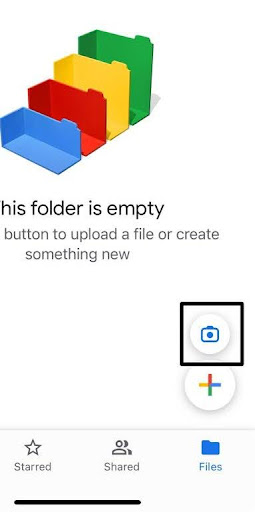
Clicking + button will start the scanning process. Scanning works a lot like the Notes.app. The app will try to recognize where the document is in the frame so it can select only the document. When it thinks it knows, it will automatically take the picture. What's different from the Notes.app is that you can adjust the corner after each shot. You can continue to scan documents to make a multipage PDF when you're done. After clicking Save, Google Drive will attempt to name the document based on what you've scanned. All in all, a very nice addition to the Google Drive app!
I was pretty excited when when I read about Google adding video recording to Google Slides. With the features, users will be able to include videos of themselves with the slides. My excitement was pretty short lived due to two issues. One, to view the slideshow and video you can't use mobile, you have to use the desktop browser. The other was a bigger deal, this feature is limited to the users who have purchased one of the following Google Workspace products: Google Workspace Business Standard, Business Plus, Enterprise Starter, Enterprise Essentials, Enterprise Essentials Plus, Enterprise Standard, Enterprise Plus and Education Plus. Canva, which is free to schools, includes their own recording piece to their presentations, and it's a lot more powerful, so don't fret and just use Canva!
Learn21 Update
🎓 Introducing edWise: Your Comprehensive Education Management Solution 🌐
edWise emerges as the pinnacle of education management – a sophisticated blend of service and product designed to provide users with a visually enriching experience in overseeing student information. Let's delve into the professional prowess that defines edWise:
📜 360° Student View:
edWise crafts a holistic view of each student including enrollment status, medical alerts, IEPs, grades, discipline records, and schedules. edwise creates a centralized repository for comprehensive student management.
👩🏫 Teacher Profiles:
Empower educators with comprehensive profiles, offering statistical insights across all classes and aiding in informed decision-making.
🏫 Classroom Analytics:
Zoom into specific classes with Classroom Profiles, tailoring statistics to each class for a personalized educational approach.
📊 Insightful Analytics:
Experience streamlined data management with attendance and grade summaries, which offers a precise overview of student progress.
🌈 Diversity Analytics:
Harness the power of enrollment statistics dissected by criteria such as Ethnicity, Gender, Program Enrollment, and more. Enrollment statistics facilitate a nuanced understanding of the student body at your school.
🚸 Discipline Metrics:
Navigate the disciplinary landscape with precision using statistics categorized by factors including grade level, ethnicity, gender, and program specifics.
🕸️ Seamless Integration from Multiple Sources:
Benefit from the synergy of edWise and many different data sources, such as Student Information Systems, Assessment Programs, Discipline Software, and more, ensuring a seamless and integrated educational management experience.
🛠️ CTE Management:
Efficiently oversee CTE credentials, CTSO activities, and Work-Based Learning, providing students with the necessary tools for real-world success.
🌟 User-Friendly Interface:
Combining functionality with aesthetics, edWise offers a visually pleasing and user-friendly interface, which enhances efficiency in education management.
🌐 Interconnected Features:
Link contacts, notes, and file attachments seamlessly, ensuring a cohesive and interconnected educational journey.
Elevate your education management experience with edWise – where innovation meets education, and efficiency becomes synonymous with excellence. 🚀🎓
Extra Credit
It's probably not much of a surprise, but researchers have verified that workers are less productive and make more typos in the afternoon. Now you have validation for choosing the type of work your students do in the morning vs the afternoon.
Technology not only influences our lives, but also changes our thinking processes, including how we read and process information. Studies reveal that reading on screens versus paper activates different cognitive processes, with cultural biases often favoring paper. Interestingly, the ease of reading on screens might hinder memory retention, as some difficulty (disfluency) in processing information can improve retention. Moreover, digital reading encourages focus on specific details over abstract thinking, which could affect cognitive skills like empathy and creativity.
Do kids today have worse behaviors than they have had in the past (CURMUDGUCATION)? I've always wondered how kids could continually get worse, since it seems like adults have always complained about it. Apparently, this belief goes back thousands of years, and it is perpetrated by the adult's own traits when they see a child lacking in a trait that the adult feels is important.
An article on Educators Technology pointed me toward The Project Gutenberg Open Audiobook Collection This is a collection of thousands of audiobooks of public domain books. The narration is done with AI, and it sounds pretty good. Keep in mind these books are public domain works, so they will have older publication dates.
Bytes and Insights is written by Eduk8me’s Ryan Collins who writes about education and educational technology. He’s also the Director of Technology for Kenton City Schools in Ohio. Sign up for his Of Bits and Bytes newsletter at https://eduk8.me.