
Turning Research into Practice: Leveraging Generative AI in K-12 Education AI Video Series
We hope you will join the Learn21 Team in a research-based exploration of the future of education, where generative AI not only supports teaching and learning but also inspires a new generation of thinkers, innovators, and learners. "Turning Research into Practice: Leveraging Generative AI in K-12 Education" is a video series developed by the team at Learn21 to address topics related to generative AI in education and provide practical applications of using AI in K-12 schools. Through the series, you will learn what current research says about the art of prompt engineering, the integration of AI with pedagogical strategies, and the impact of AI in various learning environments, and more. Each 10-minute video is designed to answer pressing questions educators and administrators face today, from harnessing AI to empower teachers to navigating its challenges, fostering deeper cognitive engagement, and promoting critical thinking and metacognition among students.
Each video in this series is grounded in current research and aimed at offering practical advice, theoretical insights, and actionable strategies for educators and administrators looking to navigate the integration of generative AI into educational settings effectively. Our approach ensures that viewers not only understand the potential and challenges of generative AI in education but also receive guidance on harnessing its power to enhance teaching and learning outcomes.
Below are the Topics in our Video Series with link to the first three videos we have shared on YouTube:
- Video 1: Empowering Educators with Generative AI
- Video 2: Navigating the Challenges of Generative AI
- Video 3: Transforming Learning Environments with AI
- Video 4: The Science of Prompt Engineering
- Video 5: Integrating AI with Pedagogical Strategies
- Video 6: Enhancing Online Learning through AI
- Video 7: Fostering Deeper Cognitive Engagement
- Video 8: AI's Role in Promoting Metacognition
- Video 9: Strategies for Cognitive Engagement and Metacognition
- Video 10: Prompt Engineering and Critical Thinking
- Video 11: Bonus Features
Where to Watch
You can watch new videos on our YouTube Channel or on our Website. New videos will be uploaded each Thursday morning.
We are excited to share this new project with you. As you watch the videos please share with fellow educators who are curious about the future of AI in education. You can support our video series by engaging with the videos on YouTube, subscribing to our channel, and liking and commenting on our videos.
If you have questions about how to approach using AI in your school or district our team is here to help! Please reach out to us at engagements@learn21.org to get the conversation started!

Video 4: The Science of Prompt Engineering
We're excited to announce the fourth video in our 11-week series, "Turning Research into Practice: Leveraging Generative AI in K-12 Education."
This week we are addressing the question, what does the research say about prompt engineering in education? We are examining the art of crafting effective prompts for AI tools, emphasizing strategies that enhance learning outcomes and foster student engagement.
Check it out, leave a comment and let us know what you think. We're reviewing and reporting on the research to amplify your abilities. Let us know how we're doing. Oh, and Like and Subscribe while you're there.
The New Apps
Many apps we use today are simply websites, such as docs.google.com and outlook.com. There are many advantages for users and companies when creating an app as a website instead of an application. For users, it eliminates the need to download and install apps. It also allows for cross-platform functionality, meaning users can access the app from any device with an internet connection. Everything syncs automatically so there is no need for manual syncing between devices.
For businesses, it saves a lot of resources as they do not have to create and maintain separate versions of the app for different platforms. Web apps can be updated and maintained much more efficiently, as changes to the website are reflected immediately on the app without users having to download updates.
Why use a website as an app instead of in the browser?
When you use a website as an app, it gets its own window and doesn't have to compete with other browser tabs. This can make tasks such as managing emails, editing documents, or streaming media more streamlined and less cluttered. Not only can you reduce the number of distractions from other tabs or bookmarks, you can also customize your workspace by arranging the website app windows as you wish. You can switch between website apps in the same way you would with standalone apps.
Using a website as an app also allows more natural notifications. Instead of an app’s notifications being masked within the myriad of browser tabs, website app notifications are pushed directly to your device. This can provide more immediate, noticeable alerts that mimic the notifications you would receive from a traditional standalone app.
How to Use Websites as Apps
Most modern browsers like Chrome, Firefox, and Edge now support a feature called Progressive Web Apps (PWA). This technology allows a user to "install" a website as an app on their device.
Note: Safari on macOS Sonoma now allows you to use any webpage as an app.
The general steps to use a website as an app are:
- Open the website you want to install in your web browser.
- Look for a "download" or "install" option within the website itself. This is usually available in the address bar or website "settings" menu. The exact method may vary based on the browser, but the option is typically represented by a plus (+) icon, a downward arrow, or an icon that resembles a computer or mobile screen.
- Click on that option. A prompt will appear asking if you want to install this website as an app.
- Click 'Install' or “Yes.” The website will now open in its own window without an address bar or tabs.
Each time you want to use the app you can open it like any other app. Web apps function just like a regular app. They can be pinned to your start menu, taskbar, or home screen for easy access. Some web apps also function offline, depending on the website's functionality.

Tips and Tricks
Typing Macrons and Breves over vowels
This past week, I learned that the bar over a vowel that signifies a long sound is called a "macron" and the short sound “u” shaped symbol is called a "breve":
ā ă ē ĕ ī ĭ ō ŏ ū ŭ
The characters are already on your computer for you to use, but the trick is to figure out how to type them.
Copy & Paste
I created a Google Doc with the characters which you can use to copy the characters you need. To paste the characters unformatted which will allow them to pick up the formatting at their destination, paste with {Command/Control}{Shift}{v} (command or control depending on if you are using a Mac or are on Windows).
Substitution
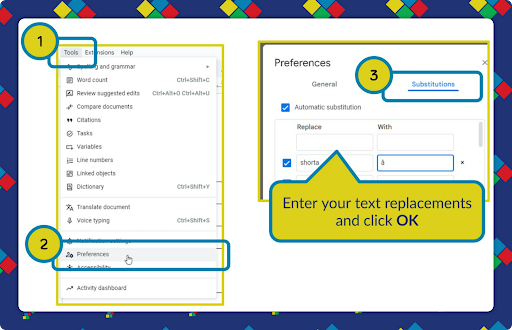
Google Docs and Microsoft Word both have the ability to do text replacement as you type.
In Google Docs, go to Tools ➡ Preferences ➡ Substitutions:
For Microsoft Word, go to File ➡ Options ➡ Proofing and select AutoCorrect Options:
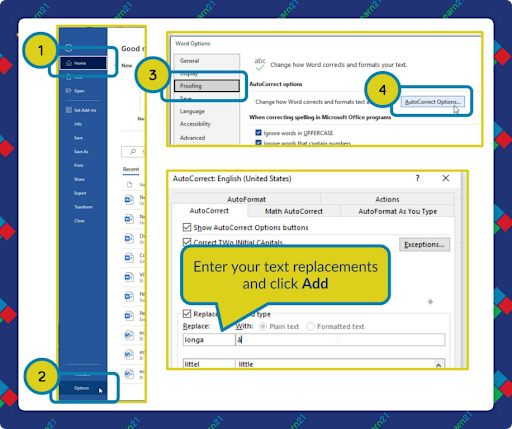
Enter your substitutions. For example, you can enter longa under Replace and paste ā into the With box. Now whenever you type longa and its space, it will be replaced with ā.
Unfortunately, the Replace text has to be typed with a space before it too. When writing out a word you’ll have to hit space, type the replace text, and then space. After the text is replaced, you’ll have to delete the extra space before the replacement.
Emoji Picker
You can use your computer’s built-in emoji picker, but this is pretty tedious. Press {Windows}{.} on Windows to open the emoji picker. On the Mac, you can use {Control}{Command}{Space}, {Fn}{e}, or {Globe}{e} to open the picker. Look under the Latin symbols to find these letters.
Learn21 Update
Championing the Future of Education: Learn21’s Advocacy on Capitol Hill
Last week, our Chief Academic Officer, Dr, Stacy Hawthorne, had the privilege of representing the EdTech Leaders Alliance (Ohio CoSN, ISTE, SETDA, and SDPC members) and Learn21 at the Spring Ed-Tech Advocacy and Policy Fly-In in Washington, D.C. This annual event brings together educators, technology leaders, and advocates from across the nation to push for enhancements in K-12 education through better use of technology. The goal was clear - to advocate for the integration of advanced technologies, including AI, in education and ensure every student has access to the tools they need for success in the digital age.
The event was a whirlwind of networking and strategic meetings held in multiple Congressional Office Buildings. The day kicked off with a comprehensive training session aimed at equipping advocates with the latest advocacy techniques and insights, ensuring all participants were ready to make a strong case for our educational technology initiatives.
Before heading off to start our advocacy efforts, we had the opportunity to meet with Deputy Secretary of Education Cindy Marten. She shared with us thoughts from the U.S. Department of Education on strategic approaches to integrating technology in education.
Key Issues Discussed
Throughout the day, we focused on several critical issues:
- Cybersecurity in Schools: We advocated for Enhancing K-12 Cybersecurity Act, emphasizing the necessity of protecting school networks from increasing cyber threats.
- Student Data Privacy: Discussions also covered the importance of safeguarding student data while enabling effective educational practices through technology.
- AI in Education: We highlighted the importance of responsibly using artificial intelligence (AI) to support teaching and learning. Our discussions stressed the need for a cautious approach where federal leaders defer to state and local judgments on AI implementation while ensuring the provision of necessary guidance and resources. This approach will safeguard a supportive learning environment for both students and teachers, ensuring that the deployment of AI technologies is informed by a broad spectrum of educational stakeholders.
- Homework Gap: According to the 2024 CoSN State of EdTech Report, the disparity in access to digital learning resources outside of school is growing and disproportionately affects low-income, rural, and minority students who may not have reliable internet access at home. We pushed for robust support of the Affordable Connectivity Program (ACP), which has been pivotal in ensuring students and teachers have the necessary broadband connectivity for homework and other educational activities. Our discussions on Capitol Hill stressed the importance of ongoing federal funding to prevent a backslide in the progress made on home connectivity, which is vital for maintaining educational equity.
- ESSA Title II-A: This ESSA provision is designed to elevate teacher and school leader quality through professional development opportunities. This is crucial for integrating technology in classrooms and enhancing instructional skills. The current funding level is $2.1 billion, but there is a pressing need to increase this to the authorized $2.3 billion to address the professional learning needs of educators.
- ESSA Title I V-A: This equally critical component of ESSA provides flexible funding that districts can use to support safe and healthy students, provide a well-rounded education, and enhance the use of technology. With a current funding level of $1.4 billion and an authorized level of $1.6 billion, fully funding this program is essential for giving states and districts the ability to invest in necessary technology and programs that foster student success and teacher readiness.
- E-Rate: On the Hill and at the FCC, we strongly advocated for the continued support of the E-Rate program, a cornerstone in ensuring that schools and libraries have the high-capacity broadband essential for modern education. Since its inception under the Telecommunications Act of 1996, E-Rate has been transformative, increasing classroom internet connections from 14% in 1998 to nearly 100% today. We emphasized the need for expanding E-Rate to cover crucial aspects like cybersecurity, given the increasing threats to school and library networks.
Engagement with Policymakers
Since Dr. Hawthorne was representing Learn21, a non-profit based in Cincinnati, Ohio, she focused her time on meeting with Congresspeople representing Ohio. Her meetings included Bradley Tauber from the office of Representative Greg Landsman, Matt Williams from the office of Senator JD Vance, and Cierra Stewart from the office of Senator Sherrod Brown. Each office was receptive to our presentations. The offices of Rep. Landsman and Sen. Vance committed to engaging further on these essential education topics. Dr. Hawthorne even invited them to our EdTech Leaders Alliance Conference happening October 20 -22 in Columbus, Ohio. Hopefully their schedules allow them to join us to hear from more education advocates.
Learn21's Role and Commitment
At Learn21, our commitment to enhancing educational technology goes beyond advocacy. We are actively involved in developing solutions that educators can implement to improve learning outcomes and make technology an integral part of education. This event was another step toward ensuring our voices are heard at the highest levels of government.
The conversations we had on Capitol Hill were promising, with significant interest shown by policymakers in pushing forward the agendas we support. The impact of this advocacy will resonate as we continue to engage with officials and stakeholders, striving for a future where each student benefits from secure, effective, and innovative technology in their education.
Thank you to the entire ETLA and Learn21 community for your support. Your passion for educational technology drives our continued advocacy and innovation. Let’s keep the momentum going and ensure that our educational systems evolve to meet the needs of every learner.
ETLA Conference Update
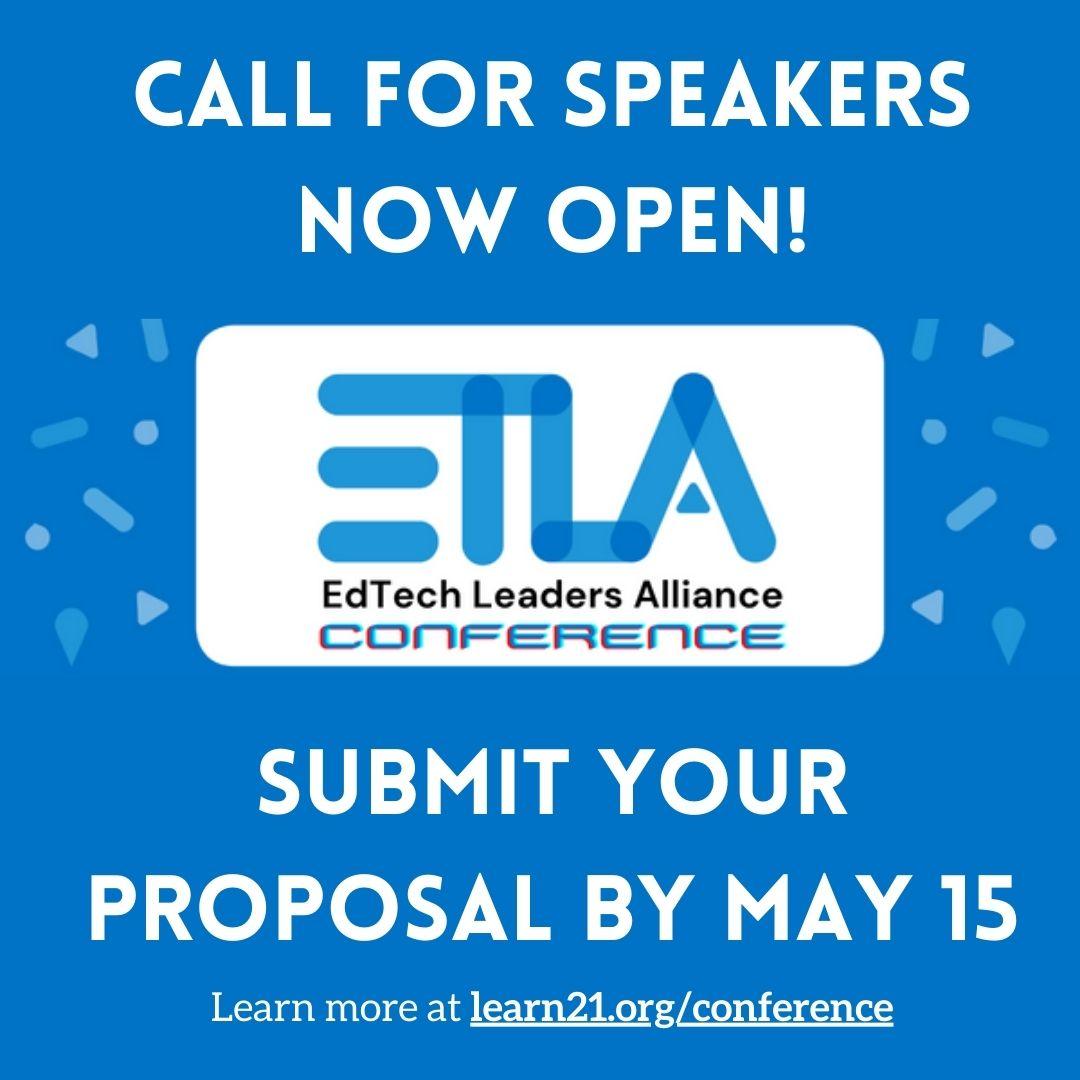
Don't forget that our second round of submissions is open until May 15th! Learn more about the conference, submit a proposal, and register at www.learn21.org/conference. We can't wait to see what proposals you have in store for us!
Extra Credit
Integrating AI into “ALL THE THINGS” has been the lead of many articles over the past year and a half, but how does it look in practice? I rarely use AI for the actual writing process, but I do use it for help with programming. It is a game changer in that respect, helping me complete scripts in half the time. However, what I’ve found is that if I didn’t have a strong programming background I wouldn’t have near the success.
A few months ago I was working on a script to lay out pictures programmatically on top of another image. This could have been done manually in Photoshop, but would have required a lot of resizing and aligning. The script didn’t take me long to write, but it kept messing up when placing the final pictures. ChatGPT was no help in finding the cause, which ended up being a boolean login error; there was a comparison using greater than when it should have been greater than or equal to. That experience has taught me to look for this error but it was no match for ChatGPT.
Experience trumps AI… At least for now.
Researchers are starting to evaluate AI on factors other than knowledge or creativity, and here they were looking at how AI shows moral guidance. Unfortunately for students in an introductory philosophy course, AI had more moral responses than the students. However, this could be just another case of AI lying with the confidence of a middle schooler who was just caught cheating on a test.
On the other hand, it remains impressive how AI can handle complex moral scenarios. The study does highlight that AI's decisions are based purely on the training materials and lacks the human considerations of empathy and understanding.
OpenAI, the creator of ChatGPT, released their FAQ for teachers last fall which included a section reiterating the fact that AI detectors don’t work but that’s not going to stop accusations of cheating. Marley Stevens wrote a paper last fall and used the Grammarly browser extension to check for spelling and grammar. Unfortunately, Turnitin flagged it as AI, the professor took the result at face value and gave her a 0 on the assignment. This in turn made her lose her scholarship.
I’m adding this to the list of stories where AI detection has gone wrong, joining a professor who was accused of being an AI bot due to neurodivergence and an autistic person being mistaken for AI.
🙋♂️ Bytes and Insights is written by Eduk8me’s Ryan Collins who writes about education and educational technology. He is also the Director of Technology for Kenton City Schools in Ohio. Sign up for his Of Bits and Bytes newsletter at https://eduk8.me!